4.8
G2
Capterra
GetApp

Best Time Tracking Apps for Teams

The best time tracking apps on the market, compared head-to-head with WebWork. Below you'll find detailed breakdowns of each popular tracker—what they offer, what they cost, who they're best for, and how they compare to WebWork's features and pricing. Choose the solution that actually fits your team's needs.

Start 14-Day Free Trial

No credit card | Cancel anytime

Book a Demo

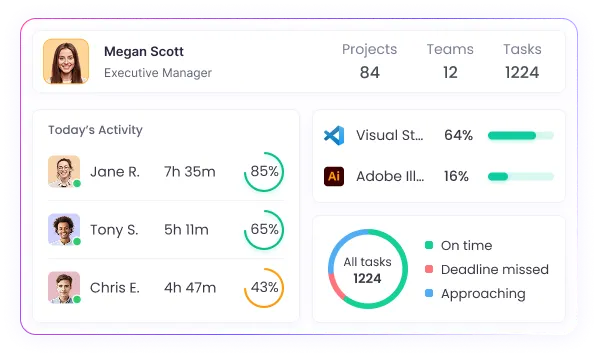
WebWork is the professional time tracker that bridges the gap between basic timers and enterprise surveillance tools. Starting at just $3.99, you get screenshot monitoring, AI-powered insights, app & website tracking, automated payroll, and complete workflow management—from clock-in to payment. Built for SMBs and growing teams who need real workforce insights without the complexity or price tag of enterprise solutions. Choose visible or silent tracking modes based on your team culture.

Start 14-Day Free Trial
Best time tracking apps on the market

Toggl Track is a popular time tracking app that excels at manual time entry and basic reporting. At $10/user/month, it offers time tracking and invoicing but lacks essential features like screenshot monitoring, automatic time tracking, payroll integration, and app/website tracking. Best suited for freelancers or teams who only need to log billable hours manually.

Best Toggl Alternative

Hubstaff offers robust employee monitoring with time tracking, screenshots, GPS tracking, and activity levels starting at $7/user/month. While feature-rich for remote teams, smaller businesses might find the multiple pricing tiers confusing—basic features start at $7, but invoicing requires $9/user and shift scheduling needs $12/user. Best for teams that need location tracking and field service management alongside time tracking.

Best Hubstaff Alternative

Clockify offers unlimited users on its free plan with basic time tracking, timesheets, and reports. Paid plans start at $3.99/user/month for admin features, with screenshots and GPS tracking at $6.99/user, and advanced features like invoicing and custom fields at $9.99/user. Popular among teams that prioritize a generous free tier for very basic time tracking needs.

Best Clockify Alternative

TimeDoctor provides comprehensive monitoring with screenshots, website tracking, and distraction alerts starting at $10/user/month. While it offers strong surveillance features and payroll integration, users frequently complain about its intrusive pop-ups, dated interface, and high pricing ($10-14/user) compared to modern alternatives offering similar features at half the cost.

Best TimeDoctor Alternative

RescueTime automatically tracks time spent on apps and websites, providing detailed productivity analytics and focus time features. Priced at $12/user/month, it specializes in personal productivity insights and distraction blocking. It's primarily designed for individual productivity rather than team time tracking, project management, or client billing features that businesses typically need.

Best RescueTime Alternative

Timely uses AI for automatic time tracking but charges premium prices—$11/user/month for individuals, $20/user for teams, and $28/user for full features. Teams of over 50 members can contact sales for enterprise pricing. While the memory tracking AI is innovative, paying 5-7x more than WebWork's $3.99 (which includes AI insights) is hard to justify for most businesses.

Best Timely Alternative

Jibble specializes in biometric time tracking with facial recognition, GPS tracking, and NFC/RFID clock-in at $2.50/user/month. While excellent for on-site teams and field workers, it lacks features remote teams need—limited screenshot capabilities, no app/website tracking, basic reporting, and no productivity monitoring.

Best Jibble Alternative

TimeCamp offers automatic time tracking starting at $3.99/user/month, but features are limited—screenshots need $7.99/user and full functionality requires $10.99/user. Beyond pricing, it lacks productivity monitoring, AI insights, and advanced project features. The automatic tracking often assigns time incorrectly, and there's no silent tracking option for company devices.

Best TimeCamp Alternative

TrackingTime offers manual time tracking with project organization at $5.75/user/month. However, it lacks essential monitoring features—no screenshots, no automatic tracking, no activity levels, and no desktop app. For nearly $6/user, you only get basic timers and reports that free tools like Clockify offer at no cost.

Best TrackingTime Alternative

Harvest offers time tracking and invoicing at a flat $12/user/month with no tiered options. While it excels at client billing and expense tracking, it completely lacks monitoring features—no screenshots, no activity tracking, no productivity insights. At $12/user, you're paying premium prices for basic time tracking and invoicing that many competitors offer alongside full monitoring features.

Best Harvest Alternative

DeskTime automatically tracks time and assigns productivity scores starting at $7/user/month. However, screenshots require the $10/user Pro plan, and essential team features like shift scheduling and API access need the $20/user Enterprise plan. Its arbitrary productivity scoring (labeling apps as productive/unproductive) often frustrates users, and it lacks invoicing entirely.

Best DeskTime Alternative

Insightful (formerly Workpuls) specializes in employee surveillance with real-time screen viewing, keystroke logging, and stealth mode capabilities at $8/user/month. While powerful for high-security environments, it's excessive for most teams—focusing on surveillance over productivity improvement. It lacks strong project management, invoicing, and the collaborative features that help teams actually work better.

Best Insightful Alternative

Paymo combines project management with time tracking, offering a free plan for 3 users but limited to 10 projects. Paid plans start at $5.90/user/month, but you'll need $10.90/user for invoicing and $16.90/user for screenshots and resource scheduling. While feature-rich for project management, it's overcomplicated and expensive if you primarily need time tracking with monitoring.

Best Paymo Alternative

TMetric starts at $5/user/month for basic time tracking, but essential features are poorly distributed across tiers. App and website monitoring requires the $10/user Professional plan, while features like time locks and bulk editing need the $20/user Business tier. This tiered structure means most teams end up paying $10-20/user for features that WebWork includes at $3.99.

Best TMetric Alternative

ClickUp is a project management platform where time tracking is an add-on feature rather than the core focus. While it includes basic time logging and reporting in its $9/user/month Business plan, the time tracking functionality is limited compared to dedicated time tracking tools—offering simple start/stop timers and basic reports without screenshots, automatic tracking, or detailed productivity monitoring. Best for teams already using ClickUp for project management who need basic time logs.

Best ClickUp Alternative

Upwork's native time tracker is designed specifically for freelancers working through the Upwork platform. It provides screenshot monitoring and activity tracking to verify billable hours for clients. While free for Upwork contracts, it's limited to that ecosystem—you can't use it for non-Upwork clients or internal team tracking. Not a standalone solution for businesses managing their own teams.

Best Upwork Alternative

Deputy is known for shift scheduling and workforce coordination, especially for frontline and location-based teams. While it offers solid scheduling, compliance, and geofencing tools, for advanced time tracking, employee monitoring, and AI-powered analytics, it requires you to switch to higher-tier plans or external systems.

Best Deputy Alternative

We360.ai is an employee monitoring and workforce analytics platform with screenshot capture, app tracking, and productivity insights. While it offers solid monitoring dashboards and customizable reports, it's heavily focused on surveillance rather than complete workforce management, lacking invoicing, payroll features, API availability, and project management tools.

Best We360.ai Alternative

When I Work is a shift scheduling platform with time and attendance tracking, team messaging, and availability management. While excellent for frontline and hourly shift scheduling in retail, hospitality, and healthcare, it completely lacks employee monitoring capabilities—no screenshots, no app or website tracking, no activity levels, and no productivity insights.

Best When I Work Alternative

Traqq positions itself as an "ethical" time tracker with activity monitoring, app and website tracking, and AI analytics. While its privacy-first approach (blurred screenshots, no invasive monitoring) appeals to some, Traqq lacks a mobile app, GPS tracking, invoicing, and meaningful project management tools.

Best Traqq Alternative

WebWork Is the Best Time Tracking App—Here’s Why

WebWork delivers professional-grade time tracking without the enterprise complexity or price tag. Unlike basic timers that only log hours or surveillance tools that invade privacy, WebWork provides the complete package—from AI-powered insights to automated payroll—starting at just $3.99/user/month. Here's what sets WebWork apart from every competitor above:

4.8 · 1,732+ reviews

What Our Customers Say

Customer review praising WebWork Time Tracker

Luis G.

Virtual agent

I like the interface and the fast way to log in with WebWork Time Tracker. Its efficiency in calculating my shift hours and the easy click to start clocking hours is great. The accuracy of tracking time and the ability to print out monthly reports are also things I really value. The initial setup was super easy.

Five star rating review of WebWork

David P.

Chief Executive Officer

I like using WebWork Time Tracker to track our team's work daily. The ability to track user activity and see activity levels is really helpful for following up on developments. I also find the idle time feature a good part of the service, and the initial setup was very easy, which I really appreciate.

Customer review praising WebWork Time Tracker

Donna G.

Administrative Assistant

I use WebWork Time Tracker to track down my hours worked for the week. The platform is easy to navigate and straightforward to understand, which makes my time records smooth and very easy to access. I really appreciate how reliable and consistent it is for tracking my time accurately every single day.

See All Reviews

Trusted and Loved by Companies Worldwide

G2 High Performer Summer 2026 EMEA  badge awarded to WebWork for top-rated time tracking software WebWork Time Tracker Best Usability Mid Market badge Summer 2026 G2 High Performer Summer 2026 badge earned by WebWork as a reliable employee monitoring software G2 Users Love Us 2026 badge awarded to WebWork Time Tracker for outstanding time tracking software G2 Leader award Summer 2026 badge for top performing software, WebWork Time Tracker G2 Momentum Leader Summer 2026 award recognizing WebWork Time Tracker as a leading time tracking software G2 Best Results Mid Market Summer 2026 badge earned by WebWork Time Tracker for time tracking software
G2 High Performer Summer 2026 badge earned by WebWork as a reliable employee monitoring software G2 Users Love Us 2026 badge awarded to WebWork Time Tracker for outstanding time tracking software G2 Leader award Summer 2026 badge for top performing software, WebWork Time Tracker
WebWork Time Tracker Best Usability Mid Market badge Summer 2026 G2 Momentum Leader Summer 2026 award recognizing WebWork Time Tracker as a leading time tracking software G2 High Performer Summer 2026 EMEA  badge awarded to WebWork for top-rated time tracking software
Enhance time tracking and employee monitoring with WebWork AI for performance analysis

The First 100% Agentic AI-Powered Time Tracker

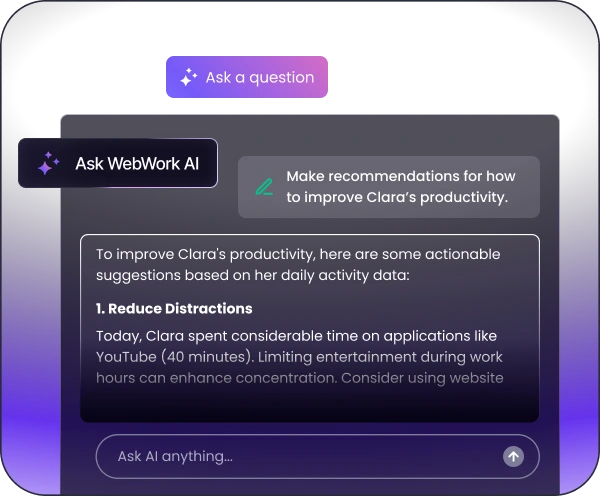
Introducing WebWork AI, your smart agentic AI assistant in time tracking and employee monitoring. Get advanced performance analysis, personalized strategies, instant custom summaries, and more. WebWork AI transforms time tracking and employee monitoring by streamlining the process and detecting irregularities, burnout risks, and other potential obstacles.

Explore WebWork AI

Trusted and loved by companies worldwide Trusted and loved by companies worldwide

Explore the Best Time Tracking App

Do you have a business with 10 or more employees? Then you’re eligible for a personalized demo! Our customer success specialists will demonstrate WebWork’s capabilities and help you integrate the best time tracking app into your workflows.

Explore the best time tracking apps for your business

FAQ

WebWork delivers professional features at $3.99/user that others charge $10-20 for. You get AI-powered insights (exclusive to WebWork), configurable monitoring (screenshots on/off/blurred), silent tracking mode for company devices, and complete workflow automation from clock-in to payroll. Unlike basic timers or invasive surveillance tools, WebWork provides the balanced solution teams actually need.
WebWork is the only time tracker with a built-in AI assistant that provides productivity insights, burnout detection, workload optimization, and pattern analysis. While Timely uses AI for automatic time logging, WebWork's AI actually helps improve team performance and prevent issues before they happen.
WebWork offers screenshot monitoring starting at $3.99/user/month with configurable settings (on/off/blurred/silent). Compare this to Hubstaff at $7/user, TimeDoctor at $10/user, or TimeCamp requiring $7.99/user for screenshots. WebWork gives you more features at half the cost.
WebWork provides silent tracking mode for company-owned devices, which runs without visible icons or notifications after employees are properly informed per your local laws. This reduces distractions while maintaining compliance. Unlike trackers that only offer intrusive visible modes with constant pop-ups, WebWork lets you balance productivity with user experience—always ensuring you follow local employment and privacy regulations.
WebWork includes automated payroll integration with PayPal, Stripe, Wise, Payoneer, and Deel at no extra cost. While TimeDoctor charges $10+ for basic payroll features and many trackers like Toggl don't offer it at all, WebWork includes full payroll automation in its standard plans.
Yes, switching is simple and we offer special discounts for teams migrating from other platforms. Our support team helps with data migration and setup, ensuring a smooth transition from tools like Clockify, Toggl, or Hubstaff.

Get the Best Time Tracking App for Teams

Start 14-Day Free Trial

No credit card | Cancel anytime