
Set up your WebWork workspace
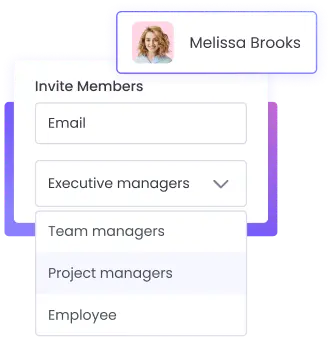
Invite members and assign them member types. For structured control over workspace management, make sure you configure the settings based on your preferences.
Track company expenses efficiently with WebWork time and expense tracking software. Record all costs and expenditures by attaching receipts and keep track of business costs.
No credit card Cancel anytime

Time expense tracking is essentially the mixture of time tracking and expense reporting. By combining these two in one place, you get to monitor how the valuable resources of your company are being spent.
Regular monitoring of expenditures helps identify unnecessary or excessive spending. By monitoring company costs with WebWork, you will adjust your team’s spending behaviors and strategies and optimize costs.
Integrating time tracking with expense management offers a clearer view of how time and resources are allocated across projects. This can help you measure profitability and productivity more effectively.
By tracking expenses in real time, you will ensure more accurate financial reporting and expense management. This leads to better insights into where the budget is being spent and aids in preventing budget overruns.
To track company expenses efficiently, here’s what you need to do:
Set up your WebWork workspace
Invite members and assign them member types. For structured control over workspace management, make sure you configure the settings based on your preferences.

Add expenses
Go to Finances > Expense Tracking and click Add expense. You can add as many details of the expense as you want. These include the date, receipt or any other file, expense category, such as office supplies, project, notes, and mark as billable. Only the Workspace Owner and Executive Managers can add expenses.
Review the added expenses
You can view all the expenses in one place and can make edits if necessary. Plus, you get to see which expenses are billable and need to be compensated.

Generate an invoice with a click without leaving the time and expense tracking software. Set billable rates and WebWork will calculate earnings automatically based on tracked hours. Then make and receive payments through integrated payment gateways—all on WebWork time and expense tracking software.
Plus, with just a few clicks, you can generate custom and hour-based invoices. The hour-based invoice will automatically extract the earned amounts based on tracked time.
Explore Invoicing
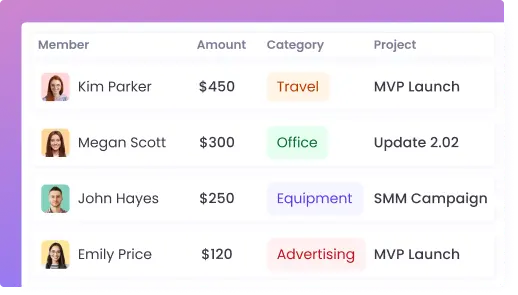
WebWork provides you with a detailed and well-documented expense report that you can review and export. You get visibility and control over company funds, crucial for managing budgets and ensuring that all expenses align with company policies.
Moreover, our expense report simplifies the process from submission to reimbursement, thus saving you time and improving operational efficiency.






Experience more features that can streamline time and expense tracking.
Create and assign unlimited projects and tasks. When adding expenses you can select the project they are referring to. Adding project expenses helps you understand the financial scope and resource allocation of each project.
Go to Projects and Tasks
Assess project costs even better with project budget tracking. Set a budget estimate for each project first. Then as employees track time on projects, you get a budget report with how much of the budget is spent by each employee, task, and tracked time.
Go to Project Budgeting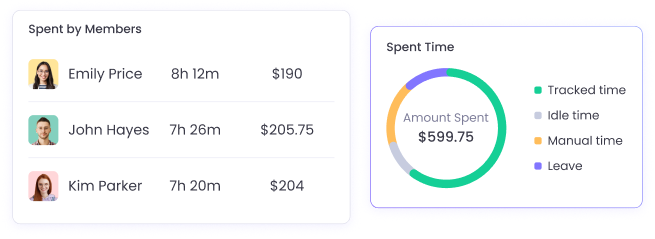
Track and manage employee earnings with a detailed payroll report. See the earnings of each employee based on their hourly rate and tracked time. In the meantime, WebWork lets you export the payroll report for Wise, PayPal, Payoneer, and Gusto.
Go to Payroll Tracking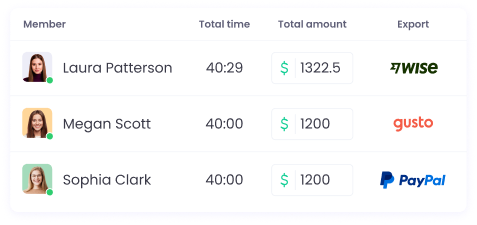
Business expense tracking is essential for maintaining accurate financial records and optimizing budget allocation to improve overall profitability.
The best way to ensure accurate business expense tracking is to use time and expense tracking software.
Use WebWork to add expenses with all their details and have a comprehensive record of company spending. Add the spent amount, expense date, category, project, receipt, and other details. All company expenses will be available to you in one place.