
Employee Payroll Hours Tracker
Manage payroll efficiently with the leading employee payroll hours tracker. Set billable rates, track time, get automated payroll reports, and pay employees.
Start 14-Day Free TrialNo credit card | Cancel anytime




How to track employee hours for payroll?
To efficiently track employee hours for payroll, you need a reliable tool that records work time accurately and automates payroll calculations. WebWork's employee timekeeping software simplifies this by recording your employees' work hours in real time. It generates a detailed payroll report that you can use for seamless payment management.

Two Ways to Use the Employee Payroll Hours Tracker

Automate the Payroll with Deel
Pay employees effortlessly by integrating with Deel. WebWork sends employee timesheets to Deel automatically based on your set pay period: daily, weekly, bi-weekly, twice a month, monthly, and custom. You save time and avoid manual calculations, ensuring your team receives accurate payments. With Deel’s global payroll, you can pay your international team in their currency and streamline the process.
Export Payroll for Payment Gateways
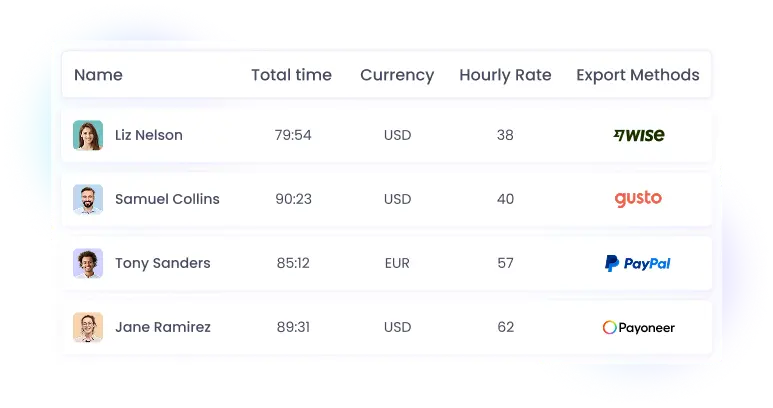
WebWork makes paying your employees easier than ever. You can export payroll reports compatible with popular payment gateways like Wise, PayPal, Payoneer, and Gusto. The time tracking integration with Gusto exports earned amounts as a spreadsheet you import with Gusto's Smart Import. Simply select the payment gateway you need. You can then upload it to the payment system and make a payment.
-
Export individually or in bulk
-
Paid overtime and paid time off
-
Automated timesheets


See Your Entire Financial Picture on the Finance Dashboard
Available on Plus plans and above, the finance dashboard shows you invoices, payroll, pending payment, expenses, and project budgets in a single view, so you can read your financial health at a glance.
- Paid and pending invoices
- Salary and payroll
- Amount billed to customers
- Awaiting payment from customers
- Payment breakdown chart
- Project budgets
- Expenses
- Alerts and required actions
Rather than checking separate reports to find issues, you see what to act on first in one place.
Track Employee Time with the Best Payroll Hours Tracker
Start payroll hours tracking with the ultimate employee payroll hours tracker. Automate payroll reports, export them and pay your employees accurately.
Automated Payroll Tracking
With WebWork, you can say goodbye to manual timesheets and calculations. Our employee payroll hours tracker automatically tracks your employees' work hours as they go about their tasks. It calculates total hours worked and generates comprehensive payroll reports based on the hourly rate. This automation reduces errors and saves you valuable company time.

Billable Hours
Set billable rates for employees for automated earnings calculation and streamlined billing. You can set billable rates not only for employees but also for projects. The tracker will use these billable rates to calculate and generate payroll reports.

Pay Employees Directly
Other than automating payroll tracking, our employee payroll hours tracker also lets you make payments on WebWork. All you have to do is fill out the amount, select the member, and the payment method from Stripe, Bitwage, and Wise. As you make a payment, you can then monitor the status and ensure it is completed.

Timesheets and Approvals
Automated timesheet tracking captures every hour your team works in real time. This removes the need for manual data entry, ensuring accuracy and transparency for each pay run. You can easily review, approve, or reject timesheets before processing payments, making the entire payroll operation smoother and error-free.

Pay with the Leading Payment Method of Your Choice
Easily export your payroll reports in the required format for Wise, PayPal, Payoneer, or Gusto. Then import the file onto these platforms to make swift and secure payments for your team.
Thousands Choose WebWork Time Tracking Software


125M+
Hours Tracked
3.2M+
Tasks Completed
342K+
Projects Succeeded
165
Countries

Customizable Payroll with Pay Periods and Currencies
Simplify international payroll management and pay employees in their preferred currency by integrating with Deel—a global HR & payroll platform. The integration lets you transfer payroll data instantly or at your set pay period for compliant and efficient global payments.
Explore Deel IntegrationLoved by Managers and Companies
Technology
Love the integration with Deel
We use the integration with Deel to manage international payroll and ensure compliance with local laws. Along with effortless time and payroll tracking, WebWork is an excellent solution for our company.

Samantha Richards
Human Resources Director Technology
501-1000 employees
Construction
Wonderful time tracker!
WebWork Time Trackers capabilities have been so wonderful. I like how effective the features of this time and expense tracking solution have been.

Oparanya J.
Finance Manager Construction
1001-5000 Employees
Staffing and recruiting
Great experience, keep going!
The desktop app is simple to use, the design considers accessibility for those of us with low vision. My company decided to give it a try to WebWork since Jibble doesn't measure productivity and Hubstaff has some issues with privacy.

Florencia S
Administrative Assistant Staffing and recruiting
51-200 employees
Human resources
Thank you for the AMAZING support!
We highly recommend WebWork for tailoring the platform to our needs, exceptional support, and seamless Deel integration, perfectly suiting our 500-member company's long-term needs. Our success manager, Christopher, is fantastic. He is always available when we need him and provides some of the best service I’ve ever experienced.

Alexandre Streit
Internal Project ManagerHuman resources
501-1000 employees
Explore More Features for Enhanced Employee Payroll Hours Tracking
Discover other powerful features of the best payroll hours tracker.
Invoices
Generate professional invoices directly from your tracked hours and send them to clients with ease. WebWork lets you create custom and hour-based invoices. You can also customize the invoices by uploading your logo.
Explore Invoices
Expense Tracking
Keep a close eye on your business expenses by logging them into WebWork, ensuring accurate financial records. Managers can add expenses with details like date, category, project, notes, and mark them as billable if necessary.
Explore Expense Tracking
Project Budgeting
Set budgets for projects and monitor them to prevent overspending and protect your profit margin. For comprehensive monitoring, you get three views of project budget spending: datagrid, project overview, and summary.
Explore Project Budgeting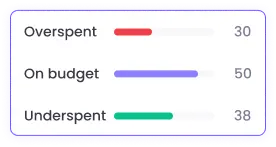
FAQ


Get the Best Employee Payroll Hours Tracking Software Now
No credit card | Cancel anytime