100% Agentic AI-Powered Time Tracking Software

The world’s most advanced agentic AI-powered time tracking & employee monitoring solution. WebWork AI understands how your team works, delivers insights tailored to each employee’s work quality, and collaborates with you by handling monitoring and reporting tasks autonomously.

Start 14-Day Free Trial

No credit card Cancel anytime

Talk to Sales
The world’s most advanced agentic AI time tracking solution

35,000+ people signed up last month

Trusted by Companies Worldwide

G2 Users Love Us 2026 badge awarded to WebWork Time Tracker for outstanding time tracking software
SoftwareSuggest Highly Recommended Winter 2025 badge awarded to WebWork as a leading time tracking software Capterra Shortlist 2026 badge received by WebWork as a top time tracking software SoftwareSuggest Highest Rated Winter 2025 badge earned by WebWork Time Tracker G2 High Performer Summer 2026 badge earned by WebWork as a reliable employee monitoring software WebWork Time Tracker Best Result Mid Market badge Summer 2026 G2 Leader Small Business award Summer 2026 badge for top performing software, WebWork Time Tracker G2 Leader award Summer 2026 badge for top performing software, WebWork Time Tracker WebWork Most Implementable G2 award Summer 2026 badge for easy to adopt software Regional Leader Summer 2026 Asia award badge to WebWork time tracking software G2 Momentum Leader Summer 2026 award recognizing WebWork Time Tracker as a leading time tracking software WebWork Time Tracker Best Usability Mid Market badge Summer 2026 G2 High Performer Summer 2026 badge awarded to WebWork as a leading eamployee monitoring software G2 Regional Leader award spring Summer badge for top performing software, WebWork Time Tracker GetApp Category Leaders 2025 award recognizing WebWork as a leading time tracking and employee monitoring software SoftwareSuggest Easy Usability Winter 2025 badge awarded to WebWork Time Tracker for intuitive time tracking software Software Advice Front Runners 2026 badge awarded to WebWork Time Tracker as a leading employee monitoring software
Trusted by Companies Worldwide
G2 Leader award Summer 2026 badge for top performing software, WebWork Time Tracker G2 Users Love Us 2026 badge awarded to WebWork Time Tracker for outstanding time tracking software WebWork Most Implementable G2 award Summer 2026 badge for easy to adopt software
WebWork Time Tracker Best Usability Mid Market badge Summer 2026 G2 Momentum Leader Summer 2026 award recognizing WebWork Time Tracker as a leading time tracking software Regional Leader Summer 2026 Asia award badge to WebWork time tracking software

WebWork AI has helped over 32,000 of our customer companies increase productivity by 40%

Automating workflows with time tracking, trusted by Zapier Best time tracker trusted by Deel Time tracking solution trusted by AutoFox for fleet management Time tracking software for team collaboration and management at Unity Arbostar’s choice for reliable business management and time tracking Trusted employee monitoring solution for secure time tracking at Axcera

WebWork AI Analyzes Performance and Delivers Solutions

Supercharge time tracking with an agentic AI assistant that delivers personalized performance insights, performs autonomous tasks, and offers actionable steps.

Analyzes performance

Measure employee performance with instant yet highly detailed analytics.

AI-powered time tracking to measure employee performance with detailed analytics

Performs autonomous actions

Delegate activities like project, task, and standup creation to WebWork AI.

AI-powered time tracker answering questions about employee performance

Suggests solutions

Receive data-driven suggestions on how to improve employee productivity or else.

AI-powered time tracker suggesting solutions to improve employee productivity

Detects irregularities

Identify irregularities in reports and uncover performance issues ahead of time.

AI-powered time tracking detecting irregularities in employee performance

Sends automated emails

Get performance, project, and member data analyses straight to your inbox.

AI-powered time tracker sending automated emails

Summarizes reports

Save time and mental effort with report summaries, tailored to your prompts.

AI-powered time tracking summarizing reports based on prompts

Answers questions

Get answers to all your questions about each employee’s performance.

AI-powered time tracker answering questions about employee performance

Connect WebWork to Claude, ChatGPT, and Other AI Assistants

WebWork now connects to Claude, ChatGPT, and other AI assistants through a Model Context Protocol (MCP) connector. Link your assistant once, then just type what you need in plain language and WebWork carries it out. Ask your assistant to start a timer, assign a task, or approve last week's timesheets, and the change happens right inside your workspace.

Run your workspace by just asking

Tell your assistant what you want and it does the work for you. You can list projects, create and assign tasks, start a timer, add time entries, approve timesheets, pull reports, or invite members — all from the same chat window you already have open.

One connection, any MCP-compatible assistant

Set up the connector once and use it with any assistant that supports MCP, including Claude and ChatGPT. There's no separate setup to repeat for each tool you want to use.

WebWork now connects to Claude, ChatGPT, and other AI assistants

Every action runs as you

The connector acts on your behalf as the signed-in user, so it follows the exact roles and permissions you already have in WebWork. It can't do anything you couldn't already do yourself from the dashboard.

You stay in control

You connect through a secure OAuth sign-in and can disconnect at any time to revoke access. Anything that deletes or archives data asks for your confirmation first, and the connector keeps no separate copy of your WebWork data.

Available to workspace Owners and Executive Managers.

Full Setup Doc

No Searching in Reports. WebWork AI Delivers What Matters.

No need to dig through reports or check timelines manually. Just ask WebWork agentic AI about your team’s activity, focus, or performance—and get precise answers and steps to take instantly. WebWork AI understands what you’re looking for and delivers insights or actions in seconds, right from WebWork, Slack, or Team Chat.

Talk to Sales
No searching in reports

10x Faster at Providing Intelligent Insights

WebWork agentic AI uses advanced language processing models to provide you with the most advanced analytical and innovative functionality.

Personalized productivity strategies

Maximize the capabilities of your team members with personalized productivity strategies. WebWork AI time tracking app analyzes each employee’s performance and suggests strategies tailored to their strengths and areas of growth.

AI-powered time tracking app suggesting personalized productivity strategies

Agentic capabilities & intelligent assistance

From creating tasks and standups to managing projects, WebWork AI assists in executing actions directly within your workflow. Ask questions like "Who's at risk of burnout?" or "How productive was the marketing team last week?" and get instant, data-driven answers.

AI-powered time tracking with intelligent assistant for task and project management

Periodic reviews

Get periodic reviews of performance analysis straight to your inbox. Select what you want the periodic reviews to be about, such as top 5 members who used non-productive apps or top 5 members with the most tracked time.

AI-powered time tracking with periodic performance review reports

Event emails

Stay on top of budget and time with email alerts. Whenever an event like project budget overrun or task budget overrun occurs, you get an email notification, so you can act fast and keep costs under control.

AI-powered time tracking with automated event email alerts

Smart work-life balance, backed by AI

Support the work-life balance of your employees with WebWork AI’s intelligent analyzing system. Foster well-being and professional productivity with AI-powered time tracking. Our time tracker with AI identifies employees at risk of burnout so you can take proactive measures.

AI-powered time tracking supporting work-life balance and identifying burnout risks

Attendance and leave analysis

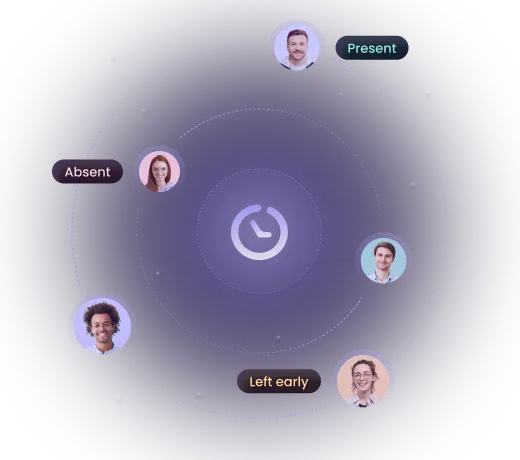
Maintain a balanced and effective workforce with AI-powered time tracking. WebWork AI analyzes employee attendance, time off and leave patterns to ensure optimal staffing levels. As a result, you make informed decisions about leave approvals.

AI-powered time tracking analyzing attendance and leave patterns
Book a Demo
Customer Support

Accurate Time, Organised Day

WebWork helps me track my time accurately and stay organized throughout the day. It makes it easier to manage tasks and stay productive.

Maria C., G2 verified review

Maria C.

Customer Support Specialist

Hourly Client Work

Reliable Hours for Hourly Work

I find WebWork Time Tracker makes it easy to know my working hours per day. It’s reliable for tracking my tasks and helps determine specific work hours since I’m paid per hour.

Trinah T., G2 verified review

Trinah T.

Small-Business user

Administrative Support

Easy to Navigate and Straightforward

I use WebWork Time Tracker to track down my hours worked for the week. The platform is easy to navigate and straightforward to understand, which makes my time records smooth and very easy to access. I really appreciate how reliable and consistent it is for tracking time every day.

Donna G., G2 verified review

Donna G.

Administrative Assistant

See All Reviews

WebWork AI Does the Work for You

From performing autonomous tasks to collaborating with your team, WebWork AI takes action so you don’t have to.

An Assistant That Keeps Everyone in the Loop

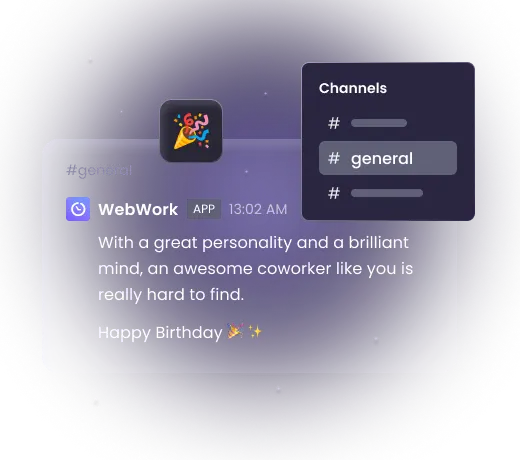
Keep your team informed without lifting a finger. WebWork AI can send updates in Slack or Team Chat, notify your team about upcoming holidays, non-working days, and even drop in to say happy birthday.

An Assistant That Takes Action

WebWork AI is more than an insight engine, it’s a hands-on assistant that works for you. Ask it to create a task, start a standup, update a member’s info, or organize a project. Whether you’re in WebWork, Slack, or Team Chat—your assistant is always ready to take action.

An Assistant You Can Talk To

With Voice Input, simply tap the microphone and speak. Your words are instantly converted into text for fast, hands-free interaction with the WebWork AI agent.Or turn on Live Voice Mode to have real-time conversations with AI. Ask questions, interrupt naturally, clarify details, and respond just like you would in a real discussion.

Fills Out Your Timesheet

With Smart Fill, WebWork AI completes the project, task, and activity description on your timesheet for you, filling in only the fields you've left empty. You decide which fields to hand off like all three or just the ones you want.

Get Started

Smart Monitoring Add-On

AI That Watches Minute-by-Minute — So You Don’t Have To.

Fully Automated Monitoring. Zero Manual Reviews

WebWork’s Smart Monitoring Add-on, our AI employee monitoring software, is more than oversight—it’s your AI analyst. While WebWork AI can already answer questions, summarize trends, and respond to your prompts, Smart Monitoring goes a step further. It silently checks minute-by-minute activity data for every employee, every day, and comes back to you with what’s worth knowing—without being asked.

AI-powered time tracking with smart monitoring add-on for automatic insights

Your Smart Assistant on Slack and WebWork Chat

WebWork AI blends into your workflow on Slack and WebWork Chat, making it even more productive. It handles the routine, so your team can focus on what matters most.

Stay informed without putting in the effort

The AI Assistant delivers powerful insights like daily and weekly updates, who showed up and when, time tracked on each project and task, all without you having to ask manually.

Bring birthday vibes to channels

Forget awkwardly late birthday wishes. The AI Assistant celebrates your teammates right on time, with cheerful messages sent directly to your Slack or WebWork Chat. Only make sure your team uses the same email for Slack and WebWork.

AI-powered time tracking software sending birthday messages in team chat

Smarter workdays with real-time AI assistance

WebWork’s AI Assistant is built to respond to your team’s needs in real time, right inside Slack. Ask WebWork AI to check on tasks, set up a standup, find out someone’s birthday, or get a holiday update.

AI-powered time tracking with real-time assistance inside Slack

Automated holiday reminders

The AI gives your team a heads-up two days before every holiday or memorial day, including whether it's a working or non-working day. You can always customize the messages to say what you want it to and to match your tone.

What can you ask WebWork AI?

Here are real prompt examples that you can use with WebWork AI.

Reporting & Insights

“Show me how many hours each team member worked this week.”

“Summarize this report for me.”

“What’s my team been working on today?”

“Which projects had the most tracked time last month?”

Productivity Monitoring

“Who was the most productive person yesterday?”

“Why is Jane showing low activity but high output?”

“How did Derek perform compared to last week?”

“Has anyone tracked more than 8 hours a day this month?”

Task & Project Management

“Create a new task for Dan in the Technical Writing project.”

“Create a new project for Kristine titled "Integration Testing Phase 1."”

Feature Assistance & System Queries

“How do I generate timesheets in WebWork?”

“Where can I find screen captures for Ann?”

Real Output from WebWork AI: Workday Breakdown

Here are real prompt examples that you can use with WebWork AI.

Jasmine Carter — Work Summary for Today (2025-06-03)

Total Time Tracked

  • 7 hours 31 minutes (all tracked, none manual, none idle)

Average Activity Level

  • 52% (moderate)

Short Summary of the Day

  • Jasmine focused heavily on design and team collaboration.

  • Most time was spent productively in Figma and Slack; occasional research and quick admin app usage.

  • No major red flags; only minor time on unrelated sites, well below concern thresholds.

Detailed Breakdown

Top Activities

  • Figma (Product Design): 4 hours 27 minutes — Creating or editing product designs.

  • Slack: 1 hour 7 minutes — Active team communication regarding product work.

  • File Management, Chrome, WebWork: <1 hour combined — Organizing files, some browsing/Google Search, and reviewing time tracker reports.

  • Other product/design-related: Short focused sessions on Dribbble (design inspiration), ChatGPT (UI/UX), and screenshot tools.

Non-Work/Minor Distractions

  • Brief visits to sites such as Doordash (delivery), Apple Music, news/article pages.

  • These add up to less than 20 minutes and do not negatively impact productivity.

Workflow Pattern

  • The entire session was consistent, with primary focus on core duties: design, team comms, checking references, and reporting.

  • High engagement in work apps, very little drift or distraction.

Assessment

  • Usual, productive day: No warning signs or irregularities.

  • Strength: Maintains focus on core responsibilities, minor web wandering expected for creative/design roles.

  • Improvement: Raising average activity level above 60% would further maximize output, but current results are healthy.

You Will Love WebWork AI, Just Like Our Users Do

G2 High Performer Summer 2026 badge earned by WebWork as a reliable employee monitoring software G2 Leader Summer 2026 award recognizing WebWork Time Tracker as a leading time tracking software G2 Users Love Us 2026 badge awarded to WebWork Time Tracker for outstanding time tracking software G2 Momentum Leader Summer 2026 award recognizing WebWork Time Tracker as a leading time tracking software G2 Best Results Mid Market Summer 2026 badge earned by WebWork Time Tracker for time tracking software
Mary G., G2 verified review

Mary G.

G2 verified review

WebWork Time Tracker solves unclear time usage and lack of accountability by accurately tracking time spent on tasks and projects.

Gabby P., G2 verified review

Gabby P.

G2 verified review

I use WebWork Time Tracker for tracking my team's productivity and ensuring trust in their time usage. I like its real-time capture and the screenshot feature.

David P., G2 verified review

David P.

G2 verified review

I use WebWork Time Tracker to monitor user activity and activity levels, which helps me follow up on developments. I like its work tracking and idle time features.

Alessandra A., G2 verified review

Alessandra A.

G2 verified review

WebWork Time Tracker helps me correctly track the time I dedicate to projects. It saves me time as I don’t need to spend a lot typing things in, and editing entries is very easy.

Luis G., G2 verified review

Luis G.

G2 verified review

I use WebWork Time Tracker to calculate shift hours and print monthly reports. It has an easy click-in feature for starting time tracking, ensures accuracy, and offers a fast, efficient interface.

Aprilyn V., G2 verified review

Aprilyn V.

G2 verified review

WebWork Time Tracker helps monitor work hours and productivity by tracking active and idle time automatically. This benefits me by ensuring accountability, providing clear records of my work, and helping me manage my time efficiently.

Javed K., G2 verified review

Javed K.

G2 verified review

WebWork Time Tracker helps me communicate with my team by showing them when I’m working. It’s convenient and operates in the background, so there’s no need to manually inform my manager or record my screen. It automates everything, which is really awesome.

Annelize P., G2 verified review

Annelize P.

G2 verified review

WebWork Time Tracker saves me from manually tracking my hours across different tasks and projects. It keeps an accurate record of my time use, helps me review productivity, and ensures my timesheets are complete, enhancing my efficiency as an executive assistant.

Clarisse M., G2 verified review

Clarisse M.

G2 verified review

Overall, my experience with WebWork Time Tracker has been positive. It has been reliable for daily use, accurate in tracking time, and helpful for managing workflow. It’s a solid upgrade after transitioning from other platforms, and it fits well for remote work environments.

FAQ

WebWork AI is an agentic AI-powered assistant built into WebWork Time Tracker. It understands how your team works, analyzes performance data, and provides actionable insights, suggestions, and summaries tailored to each employee. It can also autonomously perform activities such as creating tasks, projects, and standups, directly from your workflow. Unlike traditional time tracking tools, it doesn’t just collect data—it helps you make smarter decisions based on it.
Most time trackers with AI simply surface data or automate small tasks. WebWork AI goes further. It not only tracks time and activity but also analyzes that data, identifies productivity patterns, predicts burnout risks, and can even create projects, tasks, standups, and send periodic insights to your inbox. It works across platforms like Slack, email, and WebWork Chat, acting as a real-time assistant and not just a passive tool. Here’s how WebWork AI transforms AI time tracking:
  • Analyzes performance metrics and pinpoints opportunities for improvement
  • Suggests personalized strategies to boost productivity
  • Creates projects, tasks, standups, and sends holiday and birthday messages to chats
  • Sends you periodic performance review emails
  • Whenever a project hits the budget or time limit, the AI sends you an email
  • Informs you about burnout risks by analyzing employee performance
  • Prepares and automates sending emails with your preferred criteria
  • Summarizes reports so you don’t have to dig through them manually
  • Answers all your questions about your workspace and team members
In short, WebWork AI stands out not just by providing more data but by acting and turning that data into practical, real-time support for better productivity and smarter management. As AI is evolving fast, we do our best to enhance WebWork AI at the same speed to make it more intelligent so you experience the highest quality of time tracking with AI.

Yes. Each plan gives you a different number of credits that you can use for WebWork AI. The Pro plan gives 10 credits, Plus 25 credits, and Premium 50 credits per month. Each credit equals a message you send to the AI. You can also buy extra credits that don’t have an expiration date at $5 per 100 credits.
Yes. WebWork AI can create tasks, start standups, update employee details, and help organize projects. Whether you're in WebWork, Slack, or WebWork Chat, just ask and the AI handles the task for you, saving you time and clicks.
Absolutely. WebWork AI integrates seamlessly with Slack. You can use it to request reports, set reminders, share holiday updates, post birthday messages, and more—all from within your Slack workspace. It's designed to blend into your team's daily workflow.
You can ask anything from “Who was the most productive team member today?” to “How much time did Jasmine spend on Figma this week?” You can also ask it to create projects and tasks, request summaries, attendance breakdowns, project hours, shift info, or even team-wide stats. It understands natural language and delivers exactly what you need in seconds.
Yes. WebWork AI is designed to identify signs of burnout by analyzing tracked time, activity levels, and work patterns. If an employee is at risk of overworking or disengagement, WebWork AI can alert you and help take action early to support a healthy work-life balance.
Yes. WebWork AI can flag irregular patterns in reports, such as inconsistent time logs, low engagement with work apps, or unexpected usage of non-work-related sites. It helps you uncover hidden performance issues before they escalate.
Absolutely. WebWork AI is ideal for remote and hybrid teams, providing full visibility into team performance, engagement, and time usage without micromanaging. It ensures your team stays connected and productive, no matter where they work.
Yes. WebWork AI automates reporting entirely. You can request custom reports, summaries, and performance reviews—all tailored to your criteria and delivered instantly. No more digging through dashboards or spreadsheets.
We don’t use your data to train WebWork AI. Rest assured that we use all the information you share with WebWork AI for the mere purpose of providing you with AI features. Learn more about our privacy practices here.

Redefine Productivity with AI-Powered Time Tracking

Start 14-Day Free Trial

No credit card Cancel anytime

Book a Demo
Redefine productivity with AI-powered time tracking