
Time Tracking Audit Log
See every change in your WebWork Time Tracker workspace. In Time Edit Log, you see all time additions, edits, and deletions. In Audit Log, you see more workspace-level activity like who made setting changes, edited permissions, and any other activities.
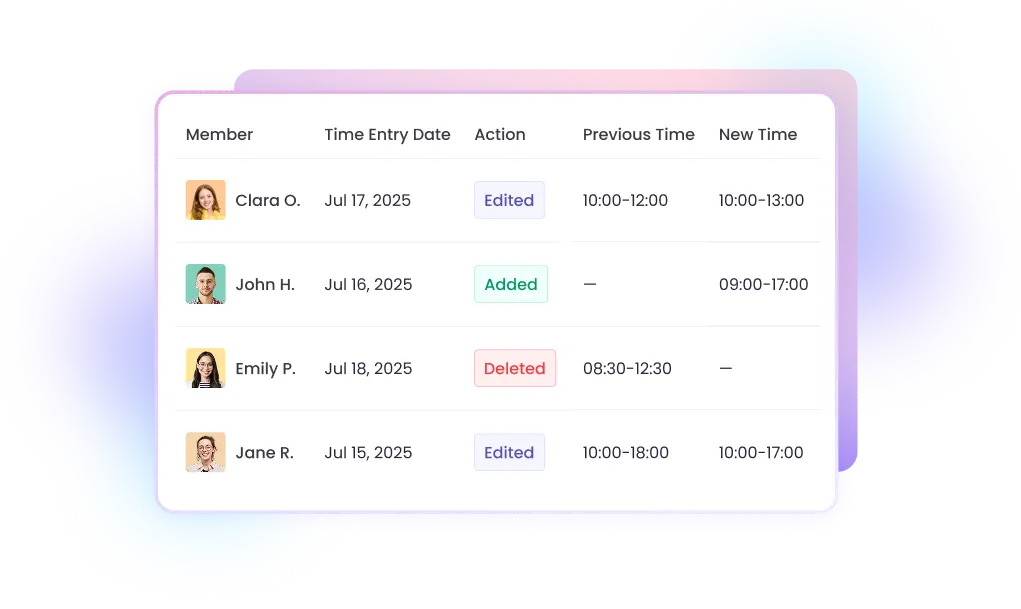
Complete Visibility Into Every Change in the Workspace
Without a detailed report of tracked time and workspace activity, you could risk disputes from clients or employees. That is why WebWork logs every action automatically and displays them in a time tracking audit log. These are time entries, edits, or removals, setting updates, member invitations, and project changes. Every log shows the change, who made it, and when they made it. That's the transparency you need for timesheet compliance, client trust, and internal accountability.
Time Edit Log: Track Every Timesheet Change
The Time Edit Log gives you a complete record of all time-related modifications across your workspace. Whenever someone adds time, edits an entry, or deletes tracked hours, you see all the details.
What the Time Edit Log captures
Each log entry includes the member affected, the initiator, the action (added, edited, or deleted), previous and new time values, the associated project and task, activity descriptions, and the page where time edit was made from.
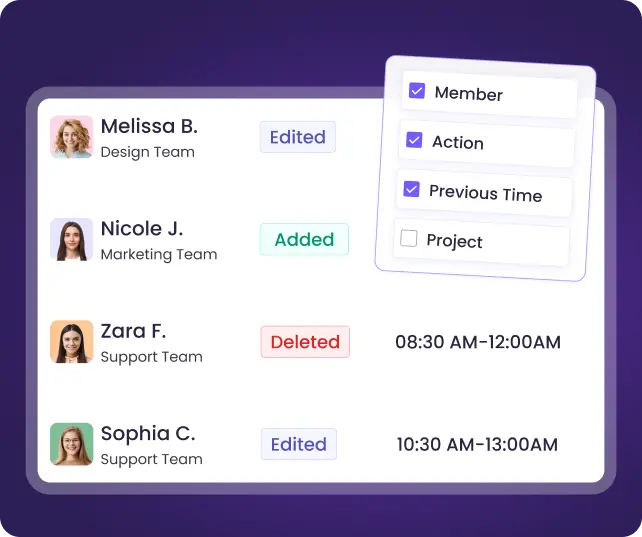
Customizable columns for your workflow
Choose exactly what data you need to see. Show or hide columns including Member, Time Entry Date, Action, Previous Time, New Time, Project, Task, Activity Description, Initiator, Change Date, Change Type, and Source.
Available on Plus and Premium plans
Audit Log: Monitor All Workspace Activity
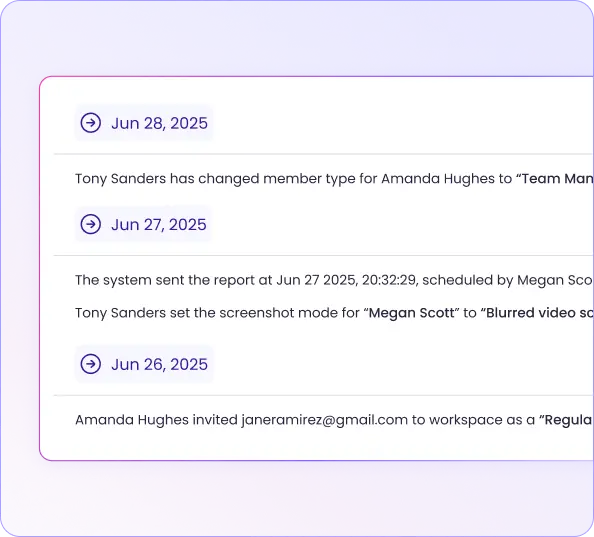
The Audit Log records every significant action taken within your workspace, not just time related. This gives you as Workspace Owners and Executive Managers full visibility into administrative changes that affect your organization.
What the Audit Log tracks
The Audit Log captures workspace settings changes, member invitations and removals, contract updates, project creation and deletion, project status changes, and other workspace-level modifications. Each entry shows who performed the action and exactly when it occurred.
Filter by activity type
Quickly find what you're looking for by filtering logs by type. Select specific categories like member, project, settings, finance, or reports to view relevant results.
Available on Plus and Premium plans
Full Audit Trail for Your Workspace
Audit Log
Track all workspace-level activity—settings changes, member management, project updates, and more. See who did what and when. For a full audit trail of company equipment, see company asset tracking.
More in Help Center
Time Edit Log
Track every change to time entries across your workspace—additions, edits, and deletions. Entries are created in WebWork’s time entry software; this log keeps the history of every change. See who made the change, the previous and new values, and which page it came from.
More in Help Center
Why Audit Logs Matter for Your Business
Stay compliant with no effort
Regulations like DCAA, SOX, and GDPR require businesses to maintain accurate records of time tracking data and demonstrate who accessed or modified it. WebWork's time edit and audit logs provide the documentation you need for compliance audits.
Resolve disputes with evidence
When a client questions billed hours or an employee disputes their timesheet, you need facts. The Time Edit Log shows exactly what changed, who changed it, and when—giving you concrete evidence to resolve issues quickly and fairly.
Build trust with transparency
Whether you're billing clients by the hour or managing a remote team, transparency builds trust. Knowing that every change is logged encourages honest time tracking and demonstrates accountability to stakeholders.
Protect your business from fraud
Time theft and unauthorized edits cost businesses thousands annually. With complete audit logs, suspicious patterns like unusual edit frequencies or after-hour changes become visible.
What Our Users Say
Shashank K.
Mid-Market user
Intuitive Interface and Accurate Time Tracking Boost Productivity
Helps eliminate guesswork around work hours by providing precise time tracking, activity monitoring, and detailed reports. That improves accountability, streamlines payroll and billing, highlights productivity patterns, and makes project planning more predictable and efficient.
Michelle L.
G2 verified user
User-Friendly Time Tracking with Immediate Updates
WebWork Time Tracker ensures every minute of work is tracked and paid for. It allows me to request overtime easily and provides proof of completed tasks. It’s user-friendly, and updates are instantly shared with my boss.

Luis G.
Mid-Market user
Effortless Tracking, Interface Wins
I use WebWork Time Tracker to calculate shift hours and print monthly reports. It has an easy click-in feature for starting time tracking, ensures accuracy, and offers a fast, efficient interface.
More Features to Keep Your Team Accountable
Timesheets & Approvals
Review employee timesheets and approve them before payroll. Pair with audit logs for complete timesheet governance.

Screenshots (Optional)
Get periodic screenshots as visual proof of work alongside your time tracking data.

Activity Level Tracking
Monitor keyboard and mouse activity to verify productivity during tracked hours.

Real-Time Monitoring
See what your team is working on right now—live project, task, and app visibility.

FAQ


Voted Top Time Tracking Software of 2026
Track Time Edit and Audit Logs in Your Workspace Now
No credit card | Cancel anytime