



Employee Timesheet Approval Software

Review, validate, and approve timesheets effortlessly with WebWork’s timesheet approval software. Automate reminders, receive timesheets directly in your inbox, and approve them with a single click. Streamline payroll, reduce errors, and save hours of manual work each pay cycle.

No credit card Cancel anytime

G2 Crowd reviews
Capterra trusted reviews
GetApp verified ratings
Efficient employee timesheet approval management process
Automating workflows with time tracking, trusted by Zapier Best time tracker trusted by Deel Time tracking solution trusted by AutoFox for fleet management Teem uses WebWork Time Tracker Trusted time tracking software for employee time management at Rocket Station Arbostar’s choice for reliable business management and time tracking Trusted employee monitoring solution for secure time tracking at Axcera Global workforce management and time tracking trusted by Groworx Trusted choice for time tracking at Saeculum Time tracking software for team collaboration and management at Resolv Global
Automating workflows with time tracking, trusted by Zapier Best time tracker trusted by Deel Time tracking solution trusted by AutoFox for fleet management Time tracking software for team collaboration and management at Unity Teem uses WebWork Time Tracker Arbostar’s choice for reliable business management and time tracking

How does the timesheet approval process work?

WebWork's employee time tracking software automatically records work hours through the desktop time tracker. Employees can adjust hours manually before submitting if needed.

Timesheets can be submitted automatically or manually by employees, then managers review and approve them, creating an efficient system for managing time records.

How to approve timesheets in WebWork?

1. Assign timesheet approvals

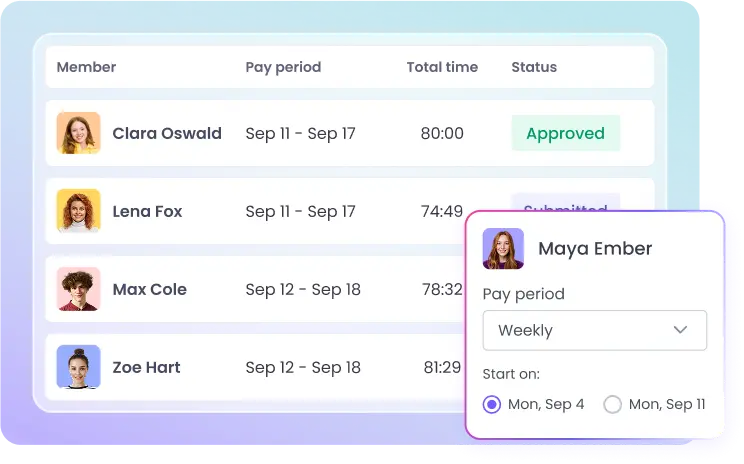
Go to Timesheets > Timesheet Approval > Assign approvals. Set details like the pay period (daily, weekly, bi-weekly, monthly, or custom) and the start date.

Assign timesheet approvals by setting pay periods and start dates for accurate employee tracking

2. Employees submit timesheets

Employees log their work hours throughout the pay period. At the end of the cycle, they submit their completed timesheets for approval.

Employees submit timesheets with logged work hours for approval at the end of each pay period

3. Review submitted timesheets

You’ll receive submitted timesheets in both your dashboard and your inbox. Review the logged hours and details before taking action.

4. Approve or reject timesheets

Approve the timesheet to make it ready for payroll processing, or reject it to send it back to the employee for corrections and resubmission.

Manager approving or rejecting employee timesheets for payroll processing or resubmission

WebWork streamlines the process of employee timesheet approval management through automation—easy submission, automated reminders, and an effortless approval process.

How WebWork Turns Approved Timesheets into Payments

Once timesheets are approved, WebWork automatically transforms them into ready-to-pay invoices or payroll entries—eliminating manual steps and keeping everything within a single platform:

Instant payroll preparation

Approved timesheets convert into payroll-ready data, complete with calculated earnings for each employee.

Invoice generation

WebWork generates professional invoices automatically from timesheet data, ready to be paid or sent to clients.

One-click payments

Use integrations like Stripe(for card payments), PayPal, Payoneer, Bitwage, Deel, Remote, Xero, or export files for payout—WebWork handles it all directly from the platform.

Full automation & accuracy

With intelligent automation, pay runs are error-free and fast—no copy-paste or spreadsheet juggling required.

Approve Employee Timesheets on Deel

If you use Deel for payroll processing, you can integrate it with WebWork to have timesheets sent directly to Deel. Enable timesheet approvals and integrate your workspace with Deel. Timesheets will be forwarded to Deel, where you can review and approve them. You are free to set the pay period for each timesheet: daily, weekly, bi-weekly, twice a month, monthly, and custom.

Explore Deel Integration

Whether you pay employees directly or through integrations like Deel, WebWork ensures that every approved timesheet flows seamlessly into payroll.

Manager reviewing and approving employee timesheets on Deel for payroll integration
Manager assigning timesheet approval permissions to specific member roles

Control Over Who Can Approve Timesheets

You have complete control over employee timesheet approvals with member-type permissions. You get to select which member types can review, approve, and reject timesheets. This customization ensures that only authorized personnel can validate work hours.

By controlling approval permissions, you can tailor the employee timesheet approval management process to fit your organization’s operational structure.

Export Submitted Timesheets

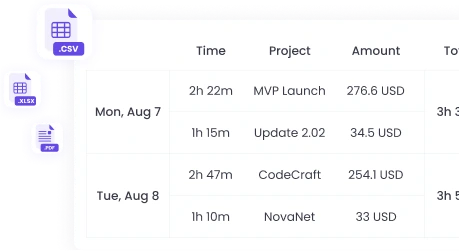
You can easily export submitted timesheets for reporting, payroll processing, or record-keeping purposes. WebWork lets you export timesheets in formats like CSV, XLSX, and PDF. You can export both submitted and approved timesheets.

Automatic Timesheet Submission

To eliminate the need for submitting timesheets manually, you can always enable automated timesheet submission. This will eliminate the need for manual submissions and automate employee timesheet approval management.

Timesheet Approval Reminders

You can have easy timesheet approvals with the help of reminders. WebWork sends automated reminders that notify you when a timesheet is submitted and ready for review. Similarly, team members receive reminders to submit their timesheets.

Such automation of employee timesheet approval management minimizes delays, prevents overlooked submissions, and ensures that everyone stays on schedule.

Multiple Pay Period Options

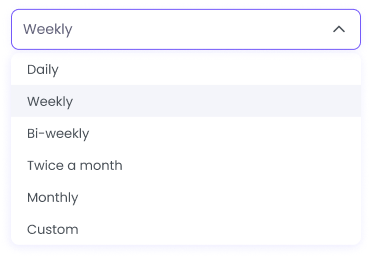
For maximum flexibility, WebWork allows you to select multiple pay periods: daily, weekly, bi-weekly, twice a month, monthly, and custom. The custom pay period lets your employees submit timesheets in any date range.

Select multiple pay periods for employee timesheet flexibility

Thousands Choose WebWork Time Tracking Software

G2 Leader award Spring 2026 badge for top performing software, WebWork Time Tracker WebWork Most Implementable G2 award Spring 2026 badge for easy to adopt software GetApp Category Leaders 2025 award recognizing WebWork as a leading time tracking and employee monitoring software Tekpon Top Time Tracking Software Q4 2025 badge awarded to WebWork Time Tracker for best time tracking solution Capterra Shortlist 2026 badge received by WebWork as a top time tracking software G2 Users Most Likely To Recommend Spring 2026 badge earned by WebWork Time Tracker for easy to use time tracking software G2 Leader Award Spring 2026 badge earned by WebWork Time Tracker for top performing time tracking software

~54M

Hours Tracked

~2.8M

Tasks Completed

~320K

Projects Succeeded

165

Countries

Benefits of Timesheet Approval for Managers and Employees

Implementing a structured timesheet approval process brings significant advantages to both managers and employees.

Benefits for managers

Enhanced oversight and control

Accurate time logging

Easy identification of irregularities

Reduced administrative burden

Improved resource allocation

Compliance with labor regulations

Benefits for employees

Confidence in accurate compensation

Simplified timesheet submission

Timely approvals and payments

Transparency and open communication

Increased job satisfaction

Reduced administrative hassle

More Features for Efficient Timesheet Approvals

Discover more powerful features of the best employee timesheet software.

Billable Hours

WebWork allows you to set specific hourly rates for each team member or project. The time tracker automatically applies these rates to the tracked hours, generating precise timesheets and payroll reports.

Explore Billable Hours
Track billable hours with specific rates for team members or projects

Payroll

Get detailed payroll reports based on tracked time and predefined hourly rates. Payroll reports provide clear insights into each employee’s total hours worked and earnings and can be exported for PayPal, Wise, Payoneer, and Gusto.

Explore Payroll
Generate detailed payroll reports based on tracked time and hourly rates

Expense Tracking

To maintain an accurate record of company expenditures, use expense tracking. WebWork enables your managers to submit company-related expenses with details like date, category, receipt, and mark them as billable if necessary.

Explore Expense Tracking
Track company expenses with details like date, category, and receipts

Time Editing

WebWork lets you edit and add time manually if need be. Whether correcting a tracking error or accounting for additional time worked, your employees can edit their tracked time. If you don’t give them permission to do so, they can request time addition.

Explore Time Editing
Edit and add time manually for accurate employee timesheets
See All Features

“WebWork Time Tracker has revolutionized our timesheet approval process. The intuitive interface allows for quick reviews and approvals, reducing errors and the time spent on payroll processing. WebWork has been a game changer for the timesheet approval process in our large team!”

Alex Johnson, Human Resources Manager

Retail Industry, 150+ employees

FAQ

Employee timesheet approval software automates the process of reviewing and validating employee work hours. It replaces manual timesheet management with digital workflows where employees submit their hours electronically, and managers can review, approve, or reject them with a single click.
Timesheet approval systems ensure accurate payroll, maintain compliance with labor laws, prevent time theft, and create accountability. They eliminate manual errors, reduce administrative work by up to 70%, and provide audit trails for disputes or compliance checks.
When rejected, a timesheet goes back to the employee for revision. When rejecting, you should provide the reason for doing so. Then your employees revise the timesheet and submit it again.
Yes, WebWork supports multiple pay periods simultaneously. You can set daily, weekly, bi-weekly, monthly, or custom pay periods for different individuals—perfect for companies with varied employee types like full-time staff, contractors, and freelancers.
Yes. You can customize the timesheet approval process to your organizational structure. WebWork lets you select which member types can review and approve timesheets.
Yes. You can make payments directly from WebWork through Stripe, Bitwage, and Wise by integrating them. You can also integrate with Xero and Deel. Learn more about integrations here.
WebWork automatically tracks work hours through desktop monitoring, captures activity levels, and can take periodic screenshots if enabled. This automated tracking eliminates manual entry errors and provides verifiable proof of work hours, ensuring 99.9% accuracy in timesheets.
G2 Crowd reviews
Capterra trusted reviews
GetApp verified ratings

Get the Leading Timesheet Approval Software for Businesses Now

Start 14-Day Free Trial

No credit card | Cancel anytime