
Customer Support Specialist
WebWork makes tracking billable hours easy! The reports make invoicing my clients a breeze.

by Colson Fairbanks
Track more than just hours—monitor agent productivity, schedule adherence, and auxiliary time across your call center operations. Whether managing 10 agents or 1000, on-site or remote, WebWork provides the visibility supervisors need to optimize performance and maintain service levels.
Start 14-Day Free TrialNo credit card Cancel anytime


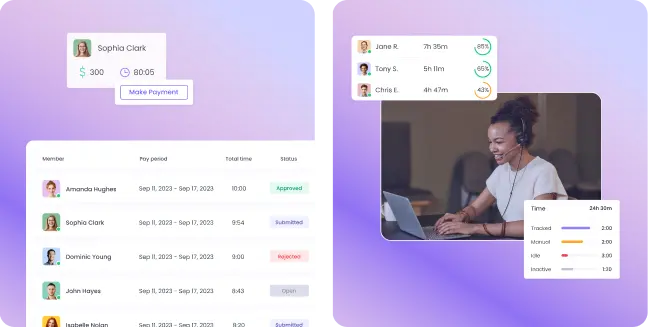



Thousands of customer support and call centers choose WebWork to streamline operations. The main reason is that our call center time tracking software provides a transparent approach to call center time management, boosting both individual and overall team performance.
See exactly how time is spent and optimize team performance with AI-powered productivity insights. Track apps, websites, and activity levels to identify patterns, prevent burnout, and keep agents focused on delivering the best customer experience.

Get clear visibility into who’s working, when, and on what. WebWork makes it easy to manage remote or on-site agents, track attendance, and align everyone around performance goals — all from a single dashboard.

Eliminate timesheet errors and simplify payouts. WebWork connects tracked hours directly to payroll and client billing, so you can pay agents confidently and on time — with seamless connections to Stripe, PayPal, Deel, Wise, and more.

Whether you’re running a 10-person support desk or a 500-agent call center, WebWork grows with you. Connect with tools your team already uses — from project management to finance — to keep workflows smooth and efficient.

Call center work means constant context switching — between tickets, calls, CRM tools like Zendesk or Salesforce, and communication apps like Slack or Teams. WebWork AI goes beyond simple tracking by analyzing these patterns in real time. It highlights when agents are spending too long in after-call work, switching excessively between tools, or showing unusual drops in activity.
AI summaries turn complex productivity data into clear insights: who’s struggling with workload balance, which shifts face performance dips, and how team efficiency trends over time. Managers can act immediately, while agents get personalized feedback to stay focused and consistent. And with WebWork AI as your 24/7 performance consultant, you can even ask direct questions — from “Which agents are overburdened?” to “How is productivity trending this week?”
Explore WebWork AI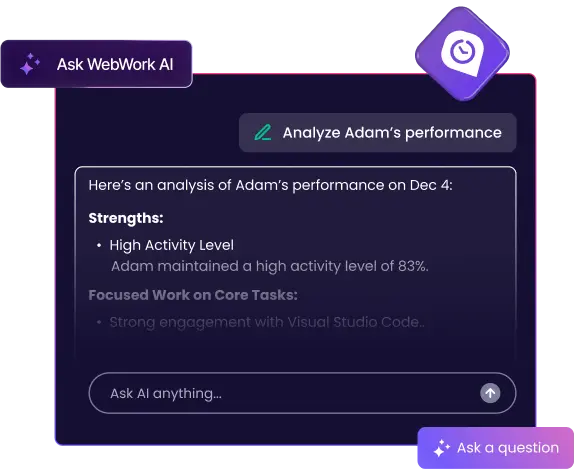
Gain full control over call center performance monitoring with powerful features built for support operations. From real-time time tracking to PTO management, WebWork equips you to run a transparent, accountable, and efficient call center.

Track every agent’s work hours in real time. See which ticket, call, or task they are handling, and what apps or CRMs (like Zendesk, Salesforce, or Freshdesk) they are using. Real-time visibility helps you ensure coverage during peak hours and quickly spot productivity gaps.
Go to Real-Time Tracking
Go beyond hours worked with detailed activity monitoring. Measure keystrokes, mouse activity, and app usage, with optional screenshots for full visibility. Identify after-call work (ACW) bottlenecks, excessive context switching, or idle periods so agents can stay focused on customer satisfaction.
Go to Activity Tracking
Simplify attendance tracking with automated clock-in and clock-out. Instantly see late starts, early logouts, and missed shifts — with reasons logged for accountability. Perfect for both on-site and remote agents.
Go to Attendance Management
Schedule unlimited shifts for your team with ease using our call center time tracking software. Whether you’re managing multiple time zones or rotating schedules, WebWork’s time clock for call centers keeps your staffing organized and consistent.
Go to Shift Scheduling
Automate payroll from clock-in to payout. WebWork calculates wages based on tracked hours and processes payments directly through PayPal, Bank Cards, Payoneer, Deel, Wise, Gusto, and more. With multi-currency support, automated approvals, and seamless integrations, your agents always get paid accurately and on time.
Go to Payroll
Enable your agents to request time off through a simple approval workflow, using an all-in-one support staff time tracking software. Flexible PTO management and customer service agent time tracking ensure your team can maintain a healthy work-life balance.
Go to Leave ManagementCall centers handle sensitive customer data, so security is non-negotiable. WebWork complies with GDPR, HIPAA, and CCPA, using DigiCert SSL and Cloudflare protection to guard against breaches. With end-to-end encryption, regular audits, and role-based access, your support operations run on a secure and compliant platform.
Learn About Security
Customer Support Specialist
WebWork makes tracking billable hours easy! The reports make invoicing my clients a breeze.
by Colson Fairbanks
Easy to Use · Time Tracking
WebWork Time Tracker is a must-have for remote work. The interface is user-friendly, and the tracking features are spot-on. Highly recommend!

by Henry C. Long
Effortlessly connect WebWork to the platforms your call center relies on, ensuring smooth data flow and streamlined daily operations. Integrations help you make the most of the time tracking app for call centers.
Seamlessly connect WebWork to Zoho Projects to track every hour spent on specific tasks and projects.
Simplify global payroll, compliance, and HR tasks by syncing time-tracking data directly to Deel. Manage international team payments quickly and accurately.
Keep everyone in the loop by receiving time-tracking, task, and project updates in Slack channels. Communicate project changes and monitor agent performance without leaving the messaging app.
Connect WebWork with PayPal to automate agent payments. Once you’ve tracked your team’s hours, you can handle transactions in just a few clicks while staying on WebWork.
Combine WebWork’s real-time tracking with Asana’s project management features for total clarity on tasks and deadlines.
Link WebWork to Wrike to efficiently merge time tracking with task management. This integration ensures your support team can adapt quickly to shifting priorities while maintaining transparent progress reports.


No credit card | Cancel anytime