
Personal PIN Codes
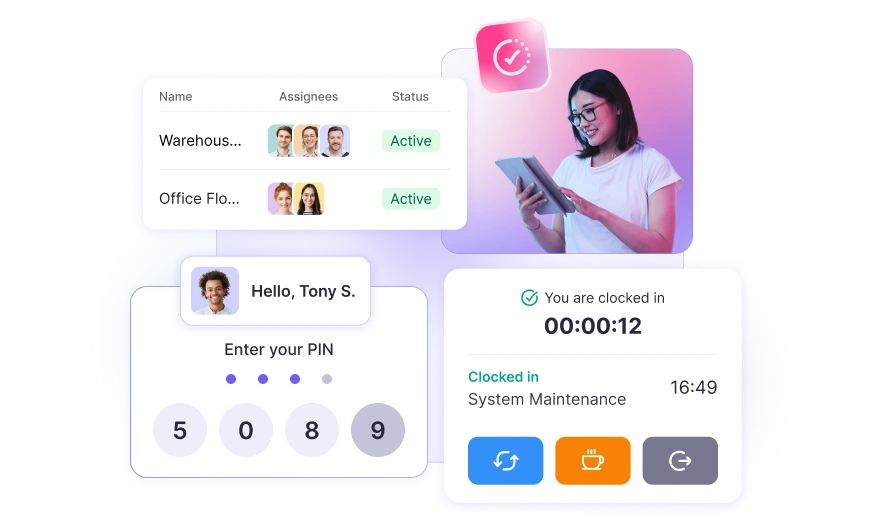
Every team member gets a unique 4-digit PIN. Only they can clock in under their name to prevent buddy punching and inflated hours.
Clock in your on-site team from a single shared device. No apps to install, no hardware to buy—just open a link and start tracking.
Set up a tablet or computer in a central spot and let employees clock in, take breaks, and switch tasks, using the same device.
Every team member gets a unique 4-digit PIN. Only they can clock in under their name to prevent buddy punching and inflated hours.
Managers can use a universal PIN to clock someone in when needed. In case someone forgets their code or is running late, use the universal PIN for them.
Create as many kiosks with unique properties as you like. Assign each to different members and share the kiosks with them.
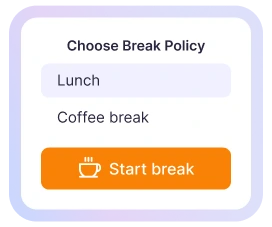
Employees tap once to start a break and again to end it. You'll see exactly how much time is work versus rest so there’s no guesswork at payroll.
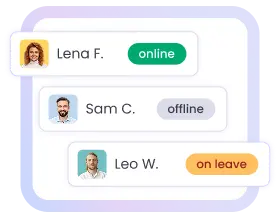
See who's clocked in, who's on break, and who hasn't arrived yet. Your dashboard updates live, so you always know where your team stands.
You can enable or disable project changing so employees can select which project or task to clock in on. Know where labor hours actually go.
The kiosk automatically resets after each clock-in, so the next person starts fresh. Similarly, you can set when the kiosk can log out on its own after the end of shift hours.
No special hardware needed. Just copy your kiosk link, open it in any browser, and you're live. Employees can start clocking in right away.
Every clock-in, break, and task switch flows straight into your WebWork reports. Filter, review, and export for payroll whenever you're ready.
01 Create a Kiosk
In the sidebar, go to Tools > Kiosks > Create Kiosk and assign the employees who'll use it. Fill out details such as:
Click Create
02 Copy the Link
Every kiosk has a unique URL. Copy it with one click and share it with your team—that's all you need to turn any device into a time clock.
03 Open and Use the Kiosk
Paste the link into a browser on your tablet, laptop, or phone. The kiosk loads instantly. Your team can start clocking in right away.
When people show up to work a shift, WebWork Kiosk makes attendance effortless.
Track shift workers across multiple floors, lines, or facilities. One kiosk per area keeps clock-ins fast and organized—even for crews that rotate.
If your staff doesn't sit at computers, give them a simple tap-in, tap-out system. Perfect for stores, restaurants, hotels, and front-of-house teams.
Set up a kiosk on a tablet in the job trailer. Workers clock in on arrival, switch tasks as the day changes, and you get accurate labor records by project.
Nurses, technicians, and support staff can clock in between patients without slowing down. Quick PIN entry means no bottleneck at shift change.
Managing multiple teams or tenants in one space? Each group can share a single kiosk—or set up separate ones. Flexible setup for flexible workplaces.
We set it up on a $150 tablet. That's it.
I was looking at time clock hardware that cost $800 plus installation. Then I found WebWork. I grabbed a cheap Android tablet, opened the kiosk link, and we were live in five minutes. Saved us thousands.
David Okonkwo
Site Supervisor | Construction
One kiosk, three different teams. No problem.
We have multiple startups sharing our office space. Each team tracks their own hours on the same device. WebWork keeps everything separate in the reports. Clean and simple.
Thomas Lindgren
Community Manager | Co-working Space
What is a time clock kiosk?
A time clock kiosk is a shared device—typically a tablet or computer—where employees clock in and out of work using a PIN code. It replaces paper timesheets and physical punch clocks with a simple digital system. Businesses place the kiosk in a central location like an entrance, break room, or job site trailer so all employees can log their hours from one screen.
How do employees clock in and out via kiosk?
To clock in and out via kiosk, employees walk up to the shared device, select their name from a list, and enter their personal PIN. The system records the exact time and syncs it to the dashboard automatically. The same process applies for starting and ending breaks. Most clock-ins take under five seconds.
What's the difference between a time clock kiosk app and regular time tracking software?
A time clock kiosk app runs on a single shared device for multiple employees to use in one location. Regular time tracking software typically requires each employee to have their own device or login. Kiosk mode is ideal for on-site teams like warehouse, retail, or construction workers who don't sit at individual computers.
Can I track time on a kiosk without buying special hardware?
Yes. With WebWork, you can track time on a kiosk using any tablet, laptop, or computer with a web browser. No proprietary hardware or app installation is required. You simply copy your unique kiosk link and open it on your device. A basic tablet is all most teams need to get started.
What should I look for in kiosk time clock software?
Good kiosk time clock software should include personal PIN codes to prevent buddy punching, break tracking, real-time attendance status, and reporting. It should also work on standard devices without expensive hardware. Look for software that syncs kiosk data with your payroll and lets you set up multiple kiosks for different locations.
Who should use a time and attendance kiosk?
A time and attendance kiosk is best for businesses with on-site employees who share a workspace but don't have individual computers. This includes warehouses, manufacturing plants, retail stores, restaurants, clinics, and construction sites. If your team clocks in at a set location each day, a kiosk simplifies attendance tracking.