
Construction Time Clock
Be aware of every job site and construction crew with an automated time clock.
WebWork uses GPS and geofencing to clock your crew in the moment they arrive on site, track their location throughout the day, and send verified hours straight to payroll. No manual timesheets, no chasing punch-ins, no guessing who showed up.
No credit card Cancel anytime


The Only Construction Time Clock Your Crew Needs on Site
Set up your job sites once, assign your crew, and WebWork handles every clock-in, clock-out, and location record from there.
Geofencing that clocks your crew in the moment they arrive on site
Draw a boundary around any job site. The moment a crew member enters the geofenced area, their timer starts and stops when they leave. No manual clock-ins, no forgotten punches, and no buddy punching.

A live location map across all your active job sites, in one view
See every crew member’s location across all active sites in real time. Know who’s on site, who’s in transit, and how long each person has been at their assigned location, without making a single call.
GPS-verified hours logged automatically
Every hour in the timesheet is tied to a confirmed GPS location and a precise timestamp. That means your payroll is built on records that can be verified, and not on what crew members remembered to log.
Timestamped, location-stamped records ready for payroll and disputes
Each visit to a job site is logged with entry time, exit time, total duration, and GPS coordinates. When a timesheet is questioned by a client or your own payroll team, the record is already there.

Trusted by 32,000+ Companies Worldwide
Trusted and Loved by Companies Worldwide


Your Crew’s Phone Is Now Their Time Clock
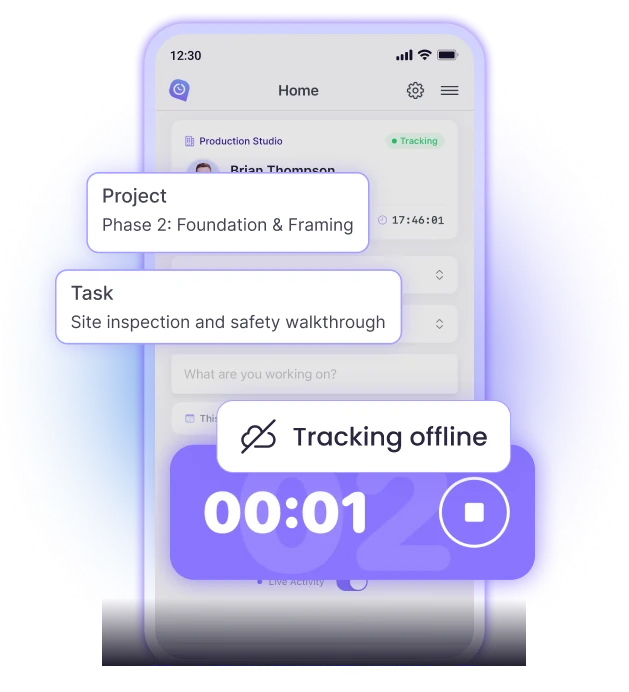
Construction crews need a time clock that works on their phone, on a remote site, with or without signal.
Available on iOS and Android
Every crew member can download WebWork for Android or iOS. The mobile app supports geofencing, GPS tracking, manual time logging, project switching, and offline tracking.
Offline tracking that syncs automatically
Even if internet connection is lost, WebWork continues tracking time and location. As the signal returns, the tracked data syncs.
Simple enough that no one needs a tutorial
Clock in, switch projects, and clock out. The crew-facing interface is designed to take seconds. Managers handle the setup; crew members just use their phones.
Construction Time Tracking That Connects Hours to Project Costs
Every hour your crew logs is assigned to a project and task from the start, so labor costs are visible in real time.
Project Budget Tracking
Set a budget estimate for each project and WebWork tracks actual labor costs against it in real time. The project budget dashboard shows estimated versus actual spend across all active projects at once, so you can see which sites are on track and which need attention.
Billable Hours
Not every hour on a job site is billable to the client. WebWork lets you separate billable from non-billable time at the project or task level, so your invoices reflect only what should be charged.
Payroll from Tracked Hours
Once timesheets are reviewed and approved, payroll runs from the same platform. No need to export to a separate system or to calculate manually. Approved hours convert into payroll-ready reports compatible with Deel, Wise, PayPal, Payoneer, and Gusto. You can also send payments directly through WebWork.
WebWork Manages Compliance for You
Construction is one of the most regulated industries for labor law. Overtime thresholds, mandatory breaks, and accurate site attendance records are all requirements. WebWork tracks all of it automatically as your crew works.


Construction Firms Track Smarter with WebWork
MID Construction moved their entire offshore workforce to WebWork after running into persistent issues with Hubstaff and Jibble. With WebWork, every hour is tied to a project, every timesheet lines up, and the team cut their time tracking costs by around 50%.
Full Case StudyWebWork AI: Your Early Warning System for Every Job Site
WebWork AI goes well beyond monitoring attendance. It’s an agentic assistant built into the platform that analyzes performance data, detects irregularities, takes action autonomously, and delivers insights without being asked.
- Detects budget and schedule irregularities early
- Analyzes crew performance and surfaces what matters
- Sends periodic performance reports to your inbox
- Flags burnout risks before they affect site productivity
- Creates tasks, projects, and standups autonomously
- Works in Slack and WebWork Chat

24/7 Global Customer Support
Ranked Top Quality on G2
99.9% Uptime in the Last 90 Days
Advanced Security and Data Privacy
How to Set Up GPS and Geofencing for Your Construction Crew
Getting your construction crew onto WebWork takes a few steps and a few minutes.
Create your workspace and add crew members
Set up your projects and job sites
Draw geofence boundaries around each site
Crew downloads the mobile app
Clock-ins start automatically
The tracker generates timesheets
Approve timesheets and export to payroll
A Complete Construction Management Platform
WebWork handles not just time and GPS tracking but also the whole process of onboarding and managing construction crews.
Attendance Monitoring
See who clocked in, who was late, and who missed a shift across every job site in real time.

Leave Management
Crew members submit leave requests directly in the app. You approve or reject with one click, and the workspace view shows who’s on leave at any given time.
Scheduled Reports
Set your reporting criteria once and WebWork delivers timesheets, attendance summaries, and hours breakdowns to your inbox on whatever schedule you need.
Shift Scheduling
Create and assign shifts for each crew member, paired with their assigned job sites. WebWork tracks hours against scheduled shifts and alerts you when someone exceeds their hours.
Timesheet Approvals
Review every timesheet before it goes to payroll. Approve, reject, or edit entries with one click, and choose whether timesheets are submitted automatically or held for manual review.

Member Types and Permissions
Control who sees what across your workspace by assigning role levels so sensitive information stays with the right people.
FAQ
Start Tracking Your Construction Crews with Confidence
No credit card Cancel anytime