
AI-Powered Automatic Work Categorization
WebWork AI automatically detects and categorizes apps and websites so productivity scores of your employees stay accurate without manual setup.
Start 14-Day Free Trial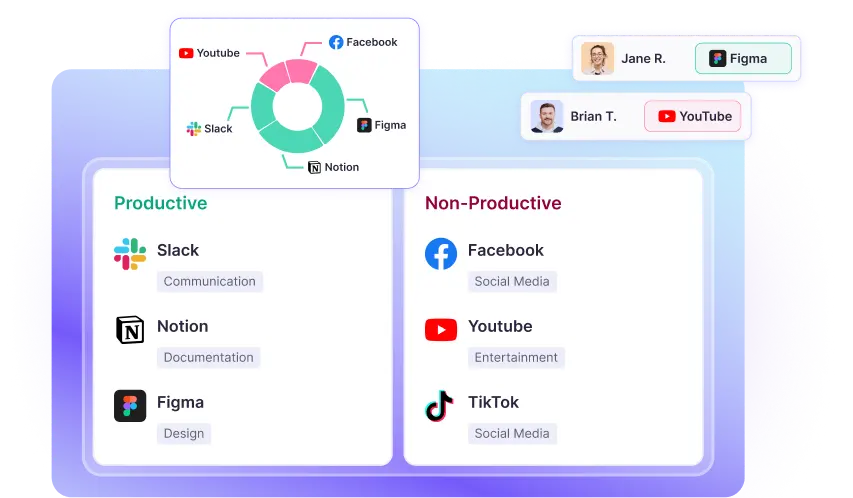
More Accurate Productivity Scores with Smarter Categorization
When your employees spend at least 10 minutes on an app or website, WebWork AI automatically detects and classifies them, eliminating the need for manual setup.
Here is what WebWork AI does:
Assigns the correct productivity label—Productive, Neutral, and Non-Productive
Applies the most relevant category, such as Communication, Development, Design, or else
Updates productivity calculations in real time for accurate reporting
Detects Productive and Non-Productive Apps
An app can be productive for one team and non-productive for another. The automatic work categorization feature of WebWork classifies each app or website as productive, neutral, or non-productive, so time spent is reflected accurately in productivity scores.
For example:
- Figma is recognized as Productive for the design team, but neutral for the support team
- Facebook is classified as Non-Productive for the whole workspace, but Productive for the marketing team
- LinkedIn is treated as Neutral
This intelligent classification ensures productivity tracking stays accurate without manual input. You can always edit the classification for each team and the whole workspace.

What Automated Work Categorization Gives You
Zero manual setup
You no longer need to review and categorize every new tool manually. WebWork AI handles it automatically.
More accurate productivity scores
Every minute tracked contributes correctly to productivity.
Scales with your team
As your teams grow and adopt new tools, the work categorization software keeps up without extra admin work.
Consistent categorization across teams
Avoid subjective or inconsistent classifications as AI applies standardized logic which you can review and edit anytime.
Cleaner reports & insights
Activity and productivity reports reflect real work patterns, making productivity data more trustworthy.
Before vs After: Manual vs AI-Driven Categorization
Before Work Categorization
Manual setup required
Uncategorized tools skew data
Your team spends time maintaining rules
Productivity scores may be misleading
After Work Categorization
Automatic AI-powered classification
New tools categorized automatically
Productivity data stays accurate
Less admin work and more clarity
Productivity Tracking That Adapts to Every Team
For Team Leads & Managers
Get clear visibility into how time is spent, without micromanaging daily activities.
Work Categorization automatically classifies apps and websites based on productivity, while still allowing you to label tools differently when needed. This means productivity metrics reflect real work context, not one-size-fits-all assumptions.
- Understand time usage at a glance
- Trust productivity scores without manual cleanup
- See accurate data tailored to each team’s workflow


For Growing Remote Teams
Scale productivity tracking as tools, roles, and workflows evolve.
As new apps and websites are introduced, WebWork AI categorizes them automatically while teams retain flexibility to define what’s productive for their role.
- Automatically handle new tools and workflows
- Adapt categorization to each team’s reality
- Keep productivity tracking accurate as tech stacks evolve
Automated by AI. Controlled by You
While it is WebWork AI that automates work categorization, including app and website detection and classification, you are still in full control. You can always review and adjust the productivity labels whenever business context requires it.
Whether a tool is productive for one team and neutral for another, or needs a custom classification, WebWork adapts to your rules.
Part of WebWork’s Smart Monitoring Ecosystem
Work Categorization for time tracking is one component of WebWork’s productivity monitoring suite designed to turn raw activity data into action.
Smart Monitoring
Get a detailed summary of each member’s performance including idle time, app usage, and engagement.

Unusual Activity Monitoring
Identify unusual patterns in employee performance such as unusually consistent activity, abnormally low activity, or suspicious keyboard behavior.

Burnout Risk
Detect and prevent employee burnout. Detailed burnout metrics give you a complete idea about each employee’s work process.

Work-Life Balance
Ensure your employees have a healthy work-life balance with automated wellness tracking and custom break reminders.

FAQ
Voted Top Time Tracking Software of 2026
Automate Productivity Tracking with WebWork
No credit card | Cancel anytime


