Employee Daily Activity Monitoring

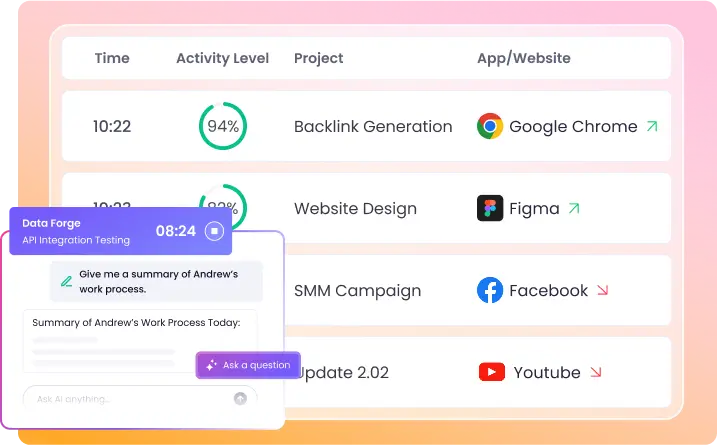
Powered by AI, WebWork transforms daily activity logs into instant insights. Track every minute of employee activity—apps, websites, clicks, and keystrokes—and let AI summarize patterns, spot irregularities, and highlight improvements.

Start 14-Day Free Trial

No credit card Cancel anytime

G2 Crowd reviews
Capterra trusted reviews
GetApp verified ratings
AI powered employee daily activity report showing tracked apps websites clicks and keystrokes

How does the Employee Daily Activity Monitoring Work?

WebWork’s Daily Activity Report gives you a detailed log of each employee’s workday. For every tracked minute, you can view the project and task being worked on, the activity description, the apps and websites used, device usage, the activity level, screenshots, visited URLs, IP address, and more.

All this data is presented in customizable columns and can be exported in CSV or XLSX format—or instantly analyzed with WebWork AI for productivity insights and performance summaries.

View a detailed employee daily activity report with tracked time

Benefits of Daily Activity Monitoring

Accountability and Transparency

Promote accountability and create transparency in tracking the work process of your employees.

Data-Driven Decision Making

Make managerial decisions based on accurate data and make performance evaluations accordingly and more easily.

Reduced Time Theft

Minimize non-work-related activities during work hours and ensure work hours are spent efficiently.

WebWork AI: Autonomous Daily Activity Reporting & Analytics

WebWork AI autonomously monitors your team’s daily performance, instantly summarizes work activities, identifies irregularities, and proactively suggests areas for improvement. It independently sends automated emails highlighting top productive members, non-productive app usage, and more.

Explore WebWork AI
Manager analyzing AI-generated employee daily activity report with insights on productivity and irregularities

Track Every Minute of Employee Activity

Monitor each and every minute of your employees’ daily activity with three customizable view options. Toggle columns on or off to focus on specific metrics, and group data by project, task, or application for deeper insights into work patterns.

Per minute

Examine the most detailed activity timeline with minute-by-minute granularity, showing what happened at 9:01 AM, 9:02 AM, 9:03 AM, and so on. View the specific app or website active during that minute, exact number of clicks and keystrokes made, and any screenshot captured in that 60-second window.

Essential for forensic-level analysis, billing disputes, or understanding precise workflow sequences.

Per duration

View duration blocks of continuous activity on the same task or application. Instead of seeing 45 individual minute entries, see one 45-minute duration block showing total clicks, keystrokes, and screenshots.

This streamlined view makes it easier to understand how long employees focus on specific tasks without interruption and identify context-switching patterns.

Per session

Analyze complete work sessions from clock-in to break or the end of work. Each session aggregates hours of activity data, showing total clicks, keystrokes, and screenshots captured during that work period.

Sessions are automatically separated by breaks, making it easy to compare morning vs. afternoon productivity, evaluate session lengths, and understand work patterns across the full workday.

Explore Time Tracker with Screenshots

Visualize Daily Activity with Smart Charts

WebWork’s Daily Activity Monitoring charts turn complex data into clear visual summaries of each team member’s daily performance. With bar, line, pie, area, and treemap chart options, you can quickly assess productivity patterns, activity fluctuations, and time distribution across tasks, apps, and websites. These visuals help you identify high-performing habits, detect potential distractions, and support data-informed coaching or workflow adjustments.

Manager visualizing employee daily activity report with smart charts showing productivity patterns and time distribution
Automating workflows with time tracking, trusted by Zapier Best time tracker trusted by Deel Time tracking solution trusted by AutoFox for fleet management Teem uses WebWork Time Tracker Trusted time tracking software for employee time management at Rocket Station Arbostar’s choice for reliable business management and time tracking Trusted employee monitoring solution for secure time tracking at Axcera Global workforce management and time tracking trusted by Groworx Trusted choice for time tracking at Saeculum Time tracking software for team collaboration and management at Resolv Global
Automating workflows with time tracking, trusted by Zapier Best time tracker trusted by Deel Time tracking solution trusted by AutoFox for fleet management Time tracking software for team collaboration and management at Unity Teem uses WebWork Time Tracker Arbostar’s choice for reliable business management and time tracking
-
Manager tracking employee activity levels with desktop time tracker for employee daily activity report

How does WebWork measure employee activity?

WebWork measures employee activity through the desktop time tracker, which monitors the number of mouse clicks, scrolls, and keystrokes throughout the workday. The desktop tracker runs on Windows, Mac, and Linux computers, automatically collecting activity data and converting it into reports. Activity levels are color-coded—green for high, orange for medium, and red for low activity—making it easy to spot productivity patterns at a glance.

Explore Employee Activity Tracking

Monitor and Measure Employee Performance Effectively

Amplify employee daily activity monitoring and team performance outcomes with the help of powerful monitoring and management features. Our employee daily activity log software offers a wide range of employee monitoring solutions.

Real-Time Monitoring

See what each employee is working on through real-time monitoring. Get detailed information like the project and task they are working on, their activity description, the app or website they are visiting right now, and more details.

Explore Real-Time Monitoring
Manager monitoring employee tasks and app usage in real time with employee daily activity report

Timesheet and Timesheet Approval

Automate time tracking and get a detailed timesheet report with the tracked time and earned amounts of your team members. Our advanced timesheet system reduces administrative effort and prevents errors. To review and approve timesheets, use the approval feature.

Explore Timesheets
Manager reviewing and approving employee timesheets with employee daily activity report

Project and Task Management

Manage projects and tasks and analyze time allocation for them. Create unlimited projects and tasks, assign them to your workspace members, and track the progress along with time. Knowing how much time each takes will allow you to allocate resources more efficiently.

Explore Projects and Tasks
Manager managing projects and tasks with employee daily activity report tracking time and progress
See All Features

FAQ

Daily Activity Monitoring is a comprehensive time tracking feature that records every minute of employee work activity. It tracks the number of mouse clicks, scrolls, keyboard strokes, active applications, websites visited, and calculates productivity levels throughout the workday. This creates a complete timeline of work activities for accountability and productivity analysis.
The Employee Daily Activity Report provides information for every tracked work minute. For each minute, you can see the task, project, and activity description, the number of mouse clicks, scrolls, and keystrokes, the activity level for that minute, the app or website visited, the URL, time tracking method, and tracker app version. Additionally, the duration and session views show the same information divided per continuously tracked duration and tracked time sessions.
Yes, if given permission. The Workspace Owner or Executive Managers can configure whether employees can view their own activity data, promoting transparency and self-improvement. Employees can use these reports to identify their peak productivity hours and optimize their work patterns.
Yes, Daily Activity Monitoring operates independently from screenshot capture. You can track all activity metrics (keystrokes, mouse events, app and website usage) without taking any screenshots, making it ideal for privacy-conscious environments while maintaining accountability.
Yes. You can export the report in CSV and XLSX formats and share them.
Yes, data is collected in real time, although it may take the system 1-2 minutes to update. However, for exact real-time data, you can use the Real-Time Report, which is updated instantly.
Yes. You can integrate your WebWork workspace with a wide range of other tools, such as Asana, Slack, ClickUp, Trello, GitHub, Xero, and more. See all integrations here.
G2 Crowd reviews Capterra trusted reviews GetApp verified ratings

Gain Transparency with Employee Daily Activity Report

Start 14-Day Free Trial

No credit card Cancel anytime