
Employee Leaderboard for Time Tracking
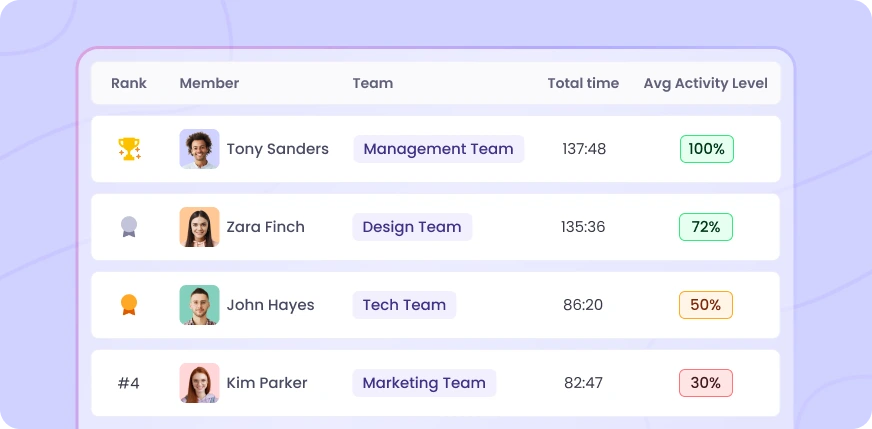
See who's leading and who's falling behind in your team. Employee leaderboard time tracking on WebWork ranks your team members by tracked time or activity level—giving you the visibility to recognize hard work, motivate your team, and make fair decisions.
Employee Recognition Shouldn't Be a Guessing Game
Without clear data, your employees’ work could go unnoticed, resulting in the wrong people getting recognized. Employee productivity leaderboard in WebWork solves that. The tracker ranks employees automatically based on real tracked time and activity data. You can clearly see who has put in how much work and can acknowledge effort accordingly.
Motivate Employees Through Visibility
When employees know their work is being measured and recognized, they are much more likely to stay motivated. That is how a transparent time tracking leaderboard creates healthy accountability. When everyone can see where they stand in the employee leaderboard report, they naturally get motivated to improve performance.


Spot Problems Before They Escalate
When a reliable performer suddenly drops to the bottom, you see it in the leaderboard and can take action to find out what is bothering them—whether it is overload or disengagement of any sort. And the opposite—when someone quietly climbs to the top, that's your signal to acknowledge and reward their effort. The leaderboard makes these patterns visible early—so you can act while it still matters. .
Make Fair Decisions with Real Data
Promotions. Bonuses. Performance reviews. These decisions shape careers—and they should be based on more than impressions. WebWork's employee leaderboard report gives you objective data to back up every decision—promotions, bonuses, and performance reviews. You get to see who tracked the most hours this quarter or who maintained the highest activity over 60 days.

Compare Teams
Filter the leaderboard by team or job title to see how different groups perform. Which department is most consistent? Are your remote employees tracking as much as in-office? Is the engineering team more active than customer support? The productivity leaderboard for employees helps you allocate resources, balance workloads, and understand what high-performing teams do differently.
Rank by What Matters to You
Employee leaderboard time tracking allows you to choose the ranking criteria:
Total Time
Who's logging the most hours? Rank by total tracked time over 7, 14, 30, or 60 days.
Activity Level
Who's most engaged? Rank by average keyboard and mouse activity during tracked hours.
You can switch between criteria anytime and customize columns to show exactly what you need. Available on Plus and Premium plans.
Export and Share Instantly
Need rankings for a performance review or leadership meeting? Export the leaderboard as CSV or XLS in one click. All filters and columns apply to your export.
More Ways to Understand Team Performance
Productivity Insights
Go beyond rankings. See activity breakdowns, app usage, focus time, and office vs remote comparisons.

Activity Level Tracking
Measure engagement through keyboard and mouse activity during tracked hours.
Real-Time Monitoring
See what your team is working on right now—live project, task, and app visibility.
Reports
Get detailed reports on tracked time, attendance, productivity, and more.

FAQ


Voted Top Time Tracking Software of 2026
Use Employee Leaderboard Time Tracking to Motivate Your Team
No credit card | Cancel anytime