

Deputy’s pricing looks attractive at first glance. It offers three plans, relatively low per-user rates, and a free trial on selected plans. However, your actual bill depends on several factors, including how many users you have, which add-ons you need, and how Deputy handles billing.
This guide covers each plan, its add-ons, billing rules, and what a 25-person company can expect to pay. It also explains which teams each plan suits and when an alternative might be a better fit.
Prices checked November 2026. All prices are in US dollars and exclude applicable taxes. Deputy may change its pricing at any time.
Deputy Pricing at a Glance
The platform offers three plans: Lite, Core and Pro. A custom option exists for larger setups. All prices below are per user, per month.
| Plan | Annual billing | Monthly billing |
| Lite | $5.00 | $5.50 |
| Core | $6.50 | $7.25 |
| Pro | $9.00 | $10.00 |
| Custom | Talk to Deputy | Talk to Deputy |
Prices checked November 2026. US dollars, before tax.
The headline prices are the annual rates. Pay month to month and each plan costs about 10% more.
Lite and Core show a free trial button. Pro shows “Contact us” instead. Three rules also sit on top of these prices, and they matter as much as the rates themselves. Every user counts, including managers. Monthly plans have a $30 minimum per invoice. Annual plans lock you in for the year.
What Each Deputy Plan Includes
Each plan builds on the one before it. Core has everything in Lite, and Pro has everything in Core. Deputy AI is currently included with every plan at no additional charge. However, Deputy describes this as an introductory offer, so its pricing and availability may change.
Lite: $5 per User
Lite includes the essential features for managing shift work. You have access to scheduling, timesheets and clocks, compliance with labor laws, shift swapping, tracking leaves and availability, basic reports, messaging with news feeds, and payroll and HR integration. It has self-service onboarding.
Lite suits smaller teams with straightforward scheduling needs. It works well when managers mainly need to organize shifts, track attendance, and manage timesheets.
Core: $6.50 per User
Core adds the automation. Deputy tags it as the most popular plan. You get advanced scheduling, timesheet auto approval, biometric clocking (face unlock on a kiosk), micro-scheduling, auto-scheduling, demand forecasting, labor optimization, and wage and labor budgets.
Core also lists a customer success manager. Deputy marks this feature with an asterisk, so check the eligibility conditions before assuming it is included in your subscription.
Pro: $9 per User
Pro is designed for larger businesses and organizations managing multiple locations. It adds custom access levels, advanced timesheets, location hierarchies, pay centers, single sign-on (SSO), a sandbox environment, a dedicated customer success manager and 24/7 live chat. Messaging+ and Analytics+ come included.
Custom, Charity and Flexible Plans
Deputy also offers special pricing for charities and not-for-profits. A Flexible Weekly plan covers short events such as conferences and festivals. Both need a conversation with the Deputy’s team.
Deputy Add-Ons and Extra Costs
Add-ons can increase your monthly costs considerably, especially when you need several additional features.
| Add-on | Price | Notes |
| Payroll (powered by Paycor) | $8/user/month + $49 monthly base fee | US only, annual Core and Pro plans. Deputy says fees vary by business size |
| HR | $2/user/month | US, UK and Australia. 30-day free trial |
| Messaging+ | $1.95/user/month | 30-day free trial. Included in Pro |
| Analytics+ | $1.50/user/month | 30-day free trial. Included in Pro |
Prices checked November 2026. Add-ons are priced monthly. Deputy takes 10% off when you pay for them annually.
Here is what each one does. Payroll sends approved timesheets, pay rates and leave into Paycor in one click. HR covers hiring, paperless onboarding, documents and staff surveys. Messaging+ adds role-based permissions and shift-aware messaging. Analytics+ adds report customization, extra audit reporting and automated report sharing.
When Add-Ons Cost More Than Upgrading
On monthly billing, Core costs 7.25peruser.AddingMessaging+(1.95) and Analytics+ ($1.50) brings the total to $10.70 per user. Pro costs $10 and includes both add-ons, along with Core’s scheduling tools. HR remains a separate $2 per-user add-on on every plan.
Payroll works differently. Deputy Payroll is available only with annual Core and Pro plans in the US. On annual Core, the plan costs $6.50 per user per month. Add the $8 Payroll fee per user and the $49 monthly base fee, and the estimated total for 25 users is $411.50 per month. Deputy says payroll fees may vary by business size, so request a quote before making a final comparison.
Billing Rules That Change What You Pay
Managers Count as Users
Deputy counts every user, administrator and supervisor. Your managers are paid seats. So are part-timers who only log in to swap a shift.
Timing matters too. Add a new user and Deputy charges the full month, even if they start five days before month end. Archive someone mid-month and you still pay for that month.
The $30 Monthly Minimum
Monthly Lite, Core, and Pro plans have a minimum spend of $30 per invoice in the US. For example, five users on monthly Lite at $5.50 each would normally cost $27.50, but the invoice would be $30. Six users would cost $33. For US annual subscriptions, Deputy’s pricing FAQs set the minimum at four users.
Annual Plans Are Locked In
Annual subscriptions come with a 12-month commitment. You can add users during the term, but you cannot reduce your prepaid user count whenever you want. Deputy’s annual billing policy also allows upgrades to a higher-tier plan, while downgrades are restricted until the final 30 days before renewal. You can cancel early, but Deputy does not refund the unused portion of your subscription.
Text Message Fees
SMS fees apply when a Deputy texts your team, for example when you publish a schedule by SMS. In the US it costs 1 cent per 160 characters. Rates differ elsewhere: 5p in the UK, 5c in Australia and 7c in the rest of the world. Many messages run longer than 160 characters, so the cost adds up on large rotas.
What Deputy Really Costs for a 25-Person Team
Per-user prices hide the real number. Here is what 25 users pay on annual billing, with WebWork alongside for reference.
| Plan | Per month | Per year |
| Deputy Lite | $125.00 | $1,500 |
| Deputy Core | $162.50 | $1,950 |
| Deputy Pro | $225.00 | $2,700 |
| WebWork Pro | $99.75 | $1,197 |
| WebWork Plus | $159.75 | $1,917 |
| WebWork Premium | $179.75 | $2,157 |
Prices checked November 2026. Annual billing, 25 users, before tax.
Monthly billing costs more. Deputy Pro for 25 users is $250 a month, or $3,000 a year.
Now add payroll to an annual Core plan. For 25 users, Deputy Core costs $162.50 per month at the annual rate. Its Payroll add-on costs $8 per user per month, plus a $49 monthly base fee. That brings the estimated monthly total to $411.50, or $4,938 per year. WebWork Plus includes payroll in its $1,917 annual cost for 25 users. This makes the difference $3,021 per year. Deputy notes that payroll fees can vary by business size, so request a quote before making a final comparison.
Which Deputy Plan Fits Which Team
- Lite: Lite suits smaller organizations with basic shift patterns. For example, a small café can use it to manage employee schedules, timesheets, and availability. Businesses with fewer than six users should check whether the $30 monthly minimum applies.
- Core: Core suits organizations that create weekly schedules based on sales and staffing demand. Automatic scheduling, demand forecasting, and labor budget management are useful for retail, hospitality, and care businesses.
- Pro: Pro suits multi-location organizations. Features such as location hierarchies, pay centers, single sign-on, and sandbox environments are useful for businesses managing more complex operations.
- Custom suits large organizations that require a custom configuration and contract negotiations.
Deputy vs WebWork Pricing
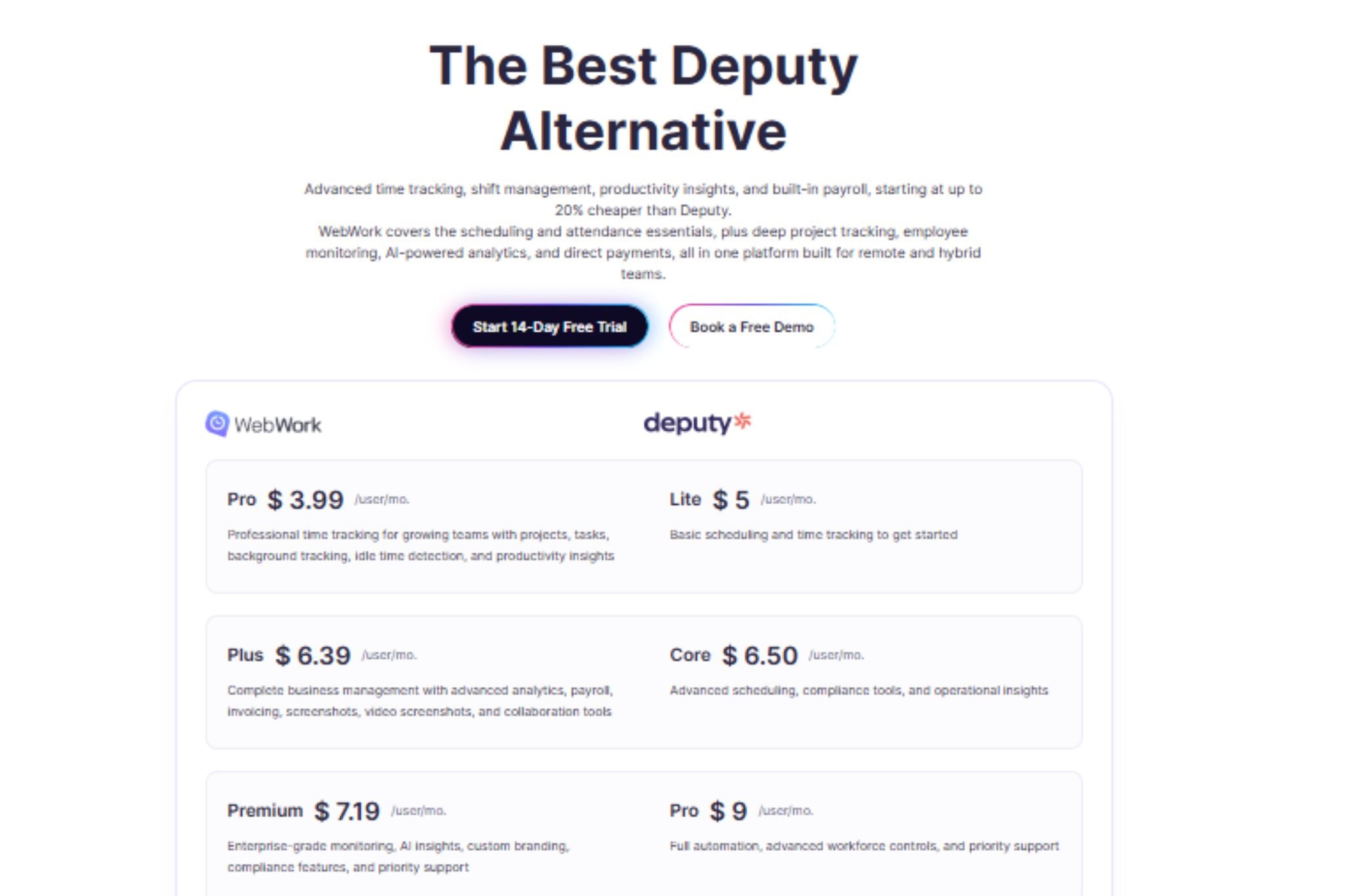
Deputy is built for shift management, while WebWork focuses on time tracking and employee productivity. If your team is project-based, remote or hybrid, look at a Deputy alternative before you commit.
WebWork has three plans on annual billing: Pro at $3.99, Plus at $6.39 and Premium at $7.19 per user per month. Pro costs $4.99 on monthly billing. The full list is on the WebWork pricing page.
| Deputy | WebWork | |
| Entry plan (annual) | $5.00 (Lite) | $3.99 (Pro) |
| Shift scheduling | All plans. Auto-scheduling from Core | Plus and Premium |
| Kiosk clock-in | Tablet clock-in. Face unlock from Core | All plans |
| Screenshots, activity levels, app and website usage | Not listed | All plans |
| Payroll | Paycor add-on, $8/user + $49/month, US only | Included in Plus and Premium; $1.50 add-on on Pro |
| Team chat | Messaging and news feed on all plans. Messaging+ is $1.95 or in Pro | All plans. Pro keeps 30 days of history |
| Video meetings | Not listed | Plus and Premium |
| SSO | Pro, $9.00 | Premium, $7.19 |
| Support | 24/7 live chat on Pro | Live chat and email on all plans |
| Security | ISO 27001 and SOC 2 Type II | HIPAA compliance on Premium |
On annual billing, WebWork’s entry plan costs about 20% less than Deputy Lite ($3.99 vs. $5.00). WebWork Premium also costs about 20% less than Deputy Pro ($7.19 vs. $9.00). The middle plans are close in price: WebWork Plus costs $6.39, compared with Deputy Core at $6.50. However, WebWork Plus includes payroll, while Deputy Core requires a separate payroll add-on.
Deputy is stronger when scheduling becomes complicated. Auto-scheduling, demand forecasting, micro-scheduling, wage budgets, location hierarchies, and pay centers make it suitable for businesses with complex shift operations. It also holds ISO 27001 certification and SOC 2 Type II compliance, which can matter to organizations with strict security requirements.
WebWork is stronger when managers need visibility into how work gets done. Its plans include screenshots, activity levels, and app and website usage tracking. Plus and Premium add advanced app and website monitoring, while shift scheduling is also available on paid plans from Plus. WebWork also offers kiosk clock-in on all plans. Its payroll feature calculates payments using tracked hours, rates, and approvals, with payment options through integrated partners. Check the pricing page for the features and limitations included in each plan.
If visibility into remote work is the goal, see WebWork’s employee monitoring software. If you’re still deciding what you need, these guides help: how to schedule employees effectively, the best attendance tracking software and what workforce management software does.
Questions to Ask Before You Buy Deputy
- How many people count as users? Include managers, supervisors and part-timers.
- Which billing cycle fits? Annual saves 10% but locks the plan. Monthly gives room to change.
- Which add-ons do you need? Add them up before you pick a plan.
- What will payroll cost for your size? Get a written quote.
- Do you need employee monitoring and productivity tracking? If yes, check whether Deputy provides the visibility your managers need or whether a dedicated time-tracking tool would be a better fit.
Frequently Asked Questions
How much does Deputy cost per user?
Deputy costs $5, $6.50 or $9 per user per month on annual billing for Lite, Core and Pro. Monthly billing is about 10% higher at $5.50, $7.25 and $10. Prices checked November 2026, in US dollars before tax.
Does Deputy have a minimum monthly charge?
Yes. Deputy’s monthly Lite, Core, and Pro plans have a minimum spend of $30 per invoice in the US. Annual subscriptions have a separate minimum of four users in the US. Prices exclude applicable taxes.
Does Deputy have a free plan?
No. Deputy’s pricing page lists no permanent free plan. Lite and Core show a free trial button, and Pro says “Contact us.” The HR, Messaging+ and Analytics+ add-ons each come with a 30-day free trial.
Is WebWork more affordable than Deputy?
On annual billing, WebWork is generally more affordable than Deputy. WebWork Pro costs $3.99 per user per month compared with Deputy Lite at $5.00. WebWork Premium costs $7.19 compared with Deputy Pro at $9.00. Deputy offers more advanced shift scheduling, while WebWork focuses on time tracking, employee monitoring, and project management. The better choice depends on your team’s requirements.
Final Thoughts
Deputy’s pricing is reasonable for businesses that need employee scheduling and workforce management tools. Its Lite, Core, and Pro plans cover different scheduling requirements, while add-ons provide additional HR, payroll, messaging, and reporting features.
However, businesses should look beyond the per-user price. Monthly minimum charges, annual commitments, paid add-ons, and user-based billing can all affect the final cost.
Before choosing a plan, calculate the total number of users, identify the features you need, and request a payroll estimate if necessary. If your main requirement is time tracking and employee productivity monitoring rather than complex shift scheduling, compare Deputy with WebWork before making a decision.