

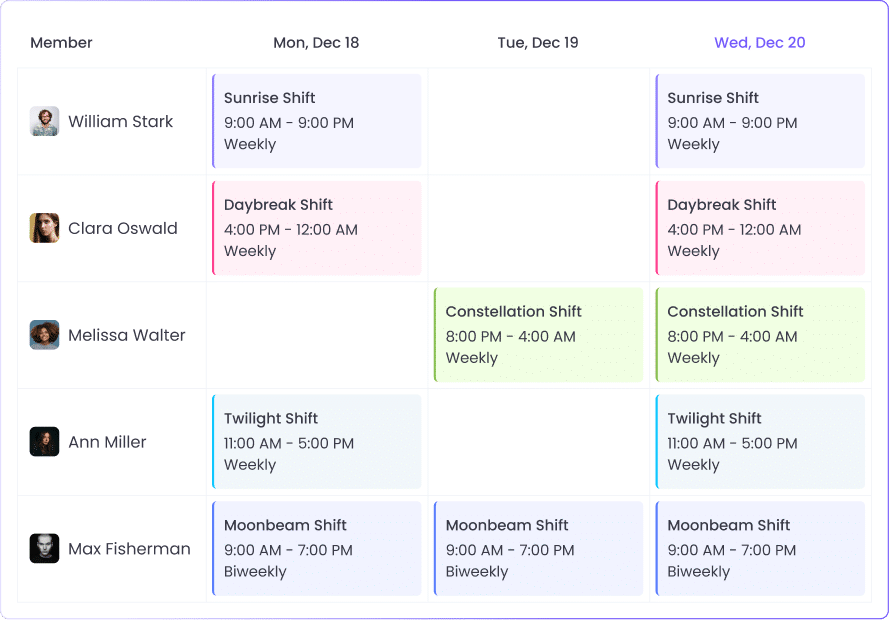
Learning how to schedule employees comes down to seven steps that apply in almost any industry. Map the hours and roles you need to cover, collect availability and time-off requests, select a shift pattern, and build the schedule with breaks included. Then check it against labor rules, publish it early with a clear process for changes, and compare scheduled hours with the hours your team actually worked.
The same process works for a 24/7 support desk on 12-hour rotations and an office team on fixed hours. The shift pattern and labor rules change between them, so both get their own sections below.
How to Schedule Employees in 7 Steps
Here is how to schedule employee shifts:
- Map your coverage needs by time block.
- Collect availability and time-off requests in one place.
- Choose a shift pattern.
- Build the schedule with breaks included.
- Check labor rules before you publish.
- Publish early and set a process for changes.
- Compare scheduled hours to actual hours.
1. Map your coverage needs
Coverage needs are the roles you need in each part of the day and how many people each one takes. Split your hours of operation into time blocks, for example four hours each, and record the headcount per role in the coverage planner below.
Past timesheets and hourly volume, such as tickets, orders, or appointments, show your peak periods. If you’re working out how to schedule work shifts for a new team with no history, start from your opening hours and the minimum staffing for each role, then adjust after a few weeks of actual hours.
2. Collect availability and time-off requests in one place
Availability shows who can work when, and time-off requests show who can’t. Ask for both before you draft, along with each person’s maximum weekly hours, and keep everything in one place, such as one form or your scheduling tool.
Collecting this first is the best way to schedule employee shifts people can actually work, because each conflict you catch here is a change you won’t have to make after posting. Set a request deadline before your posting date, and send anything later through the change process in Step 6.
3. Choose a shift pattern
A shift pattern is the repeating structure of your schedule. If you’re learning how to make a shift schedule for weekday daytime coverage, fixed weekly shifts are the simplest option. Round-the-clock coverage needs several crews on a repeating cycle, such as 4-on-4-off or 2-2-3, which the patterns section below compares.
4. Build the schedule with breaks included
Fill the hardest-to-cover slots first: specialist roles, opening and closing shifts, and peak blocks. Then add the rest, checking each one against availability and maximum hours. With several roles, locations, or rotations, employee scheduling software lets you set up recurring shifts once and assign them to people.
Schedule breaks with the shifts, staggered so every time block keeps its minimum headcount. Break tracking then shows whether those breaks were taken.
5. Check labor rules before you publish
Check every draft against the rules where your team works: overtime, rest between shifts, breaks, and advance notice.
In the US, the FLSA requires overtime pay of at least 1.5 times the regular rate after 40 hours in a workweek for covered, non-exempt employees, and the Department of Labor doesn’t allow averaging hours across two or more weeks. Federal law doesn’t require meal or rest breaks, but short breaks you do offer count as paid work time, and some states require breaks.
Some US cities and states also have fair workweek laws. Covered employers, most commonly in retail and hospitality, generally must post schedules 14 calendar days ahead, pay a premium for late changes, and give 9 to 11 hours of rest between shifts unless the employee agrees in writing, with details varying by jurisdiction (Littler’s overview).
In the UK, workers over 18 generally have the right to a 20-minute break when they work more than six hours, 11 hours of rest between working days, and 24 hours off each week or 48 hours each fortnight (GOV.UK). Everywhere else, check your local rules and any collective agreements.
6. Publish early and set a process for changes
Post the schedule as early as you can, and no later than any notice law requires. A fixed posting day, such as every other Friday, lets your team know when the next schedule will appear.
Before you publish, decide how changes work: how employees request time off or a shift change, who approves it, how fast they hear back, and how the updated schedule reaches everyone. Put the process in writing and share it with the schedule.
7. Compare scheduled hours to actual hours
After each schedule period, compare the hours you scheduled with the hours people worked. Look at late starts, early finishes, absences, and overtime, by person and by time block. For example, overtime that keeps landing in the same time block means the next schedule needs more hours there.
You can do this by hand from timesheets, or with attendance tracking that matches clock-ins to each assigned shift. In WebWork, attendance reports flag late starts and early finishes against the shift, and the desktop app asks the employee for the reason when it happens.
To see scheduled versus actual hours for your team, start a free 14-day trial, no credit card required.
Prefer a walkthrough? Book a demo and we’ll show you shifts and attendance reports.

Employee Scheduling Methods: Common Shift Patterns
Day, evening, night, and weekend shifts are the basic shift types, and our guide to the types of employee shifts covers each one. The evening shift is also called the swing shift or second shift, and the patterns below arrange these shifts across days and crews.
A rotating shift schedule moves people between day, evening, and night shifts so nights and weekends are shared, and each switch needs enough rest under the rules in Step 5. For split shifts and on-call work, check your local rules on how that time is paid. In the US, a compressed 4×10 week stays at 40 hours for federal overtime, which is calculated per workweek, though state laws can differ.
12-hour patterns for 24/7 coverage
With 12-hour shifts, two shifts cover each day and four crews cover the week: on any given day, one crew works days, one works nights, and two are off. Each crew averages 42 hours a week, but individual weeks run longer or shorter, so in the US, budget for overtime in the longer weeks.
Pattern names vary across sources. Circadian lists the 2-2-3 (also called Panama or Pitman) under several names, including 2-3-2, while some sources use “Pitman” only for a version where crews stay on fixed day or night shifts. Check the actual cycle when comparing schedules.
| Pattern | How it works | Cycle | Good fit for | Trade-off |
| Rotating shifts | Employees move between day, evening, and night shifts | Set by you, e.g., weekly | 24/7 operations on 8-hour shifts | Each switch needs enough rest time |
| Split shifts | One workday in two parts with a long unpaid break | Daily | Work with morning and evening peaks | Long span from first start to final finish |
| On-call | Employees stay available outside scheduled shifts | Rotated by week or period | Urgent or unpredictable work | Pay rules for on-call time vary by location |
| Flexible schedule | Employees choose start and end times around core hours | Daily or weekly | Office and hybrid teams | Harder to cover the start and end of the day |
| Compressed workweek (4×10) | Four 10-hour days, three days off | 1 week | Teams that can cover five days with staggered days off | Long days; check local overtime rules |
| 4-on-4-off | Four 12-hour days or nights on, then four days off | 8 days | 24/7 coverage with four crews | Days off move forward each week |
| 2-2-3 (also called Panama or Pitman) | 2 on, 2 off, 3 on, 2 off, 2 on, 3 off, on 12-hour shifts | 14 days | 24/7 coverage with four crews | Some breaks are only two days long |
| DuPont | Blocks of three or four 12-hour day or night shifts, plus one seven-day break | 28 days | 24/7 coverage with a long break each cycle | Four nights in a row; one stretch of six shifts in seven days |

Employee Schedule Templates You Can Copy
Copy these into a spreadsheet and replace the placeholders. All shift times are examples.
Weekly employee work schedule (fixed shifts)
Use this for a team on fixed weekly shifts. Totals are scheduled hours before unpaid breaks.
| Employee | Role | Mon | Tue | Wed | Thu | Fri | Sat | Sun | Total hours |
| Employee A | Role 1 | 9:00–17:00 | 9:00–17:00 | 9:00–17:00 | 9:00–17:00 | 9:00–17:00 | Off | Off | 40 |
| Employee B | Role 1 | Off | 9:00–17:00 | 9:00–17:00 | 9:00–17:00 | 9:00–17:00 | 9:00–17:00 | Off | 40 |
| Employee C | Role 2 | 12:00–20:00 | 12:00–20:00 | 12:00–20:00 | 12:00–20:00 | Off | Off | Off | 32 |
| Employee D | Role 2 | Off | Off | Off | Off | 12:00–20:00 | 10:00–18:00 | 10:00–18:00 | 24 |
4-crew rotation for 24/7 coverage (4-on-4-off)
Use this for 24/7 coverage on 12-hour shifts. Repeat the 8-day cycle, and swap day and night crews each cycle to rotate them. D = day shift (e.g., 07:00–19:00), N = night shift (e.g., 19:00–07:00).
| Crew | Day 1 | Day 2 | Day 3 | Day 4 | Day 5 | Day 6 | Day 7 | Day 8 | Hours per cycle |
| Crew 1 | D | D | D | D | Off | Off | Off | Off | 48 |
| Crew 2 | N | N | N | N | Off | Off | Off | Off | 48 |
| Crew 3 | Off | Off | Off | Off | D | D | D | D | 48 |
| Crew 4 | Off | Off | Off | Off | N | N | N | N | 48 |
Coverage planner
Use this in Step 1 to set the headcount for each time block, and again in Step 7 to check it against who actually worked.
| Time block | Roles needed | Scheduled | Gap |
| 06:00–10:00 | Role 1 × 2, Role 2 × 1 | Role 1 × 2, Role 2 × 1 | 0 |
| 10:00–14:00 | Role 1 × 3, Role 2 × 2 | Role 1 × 3, Role 2 × 1 | Role 2: 1 short |
| 14:00–18:00 | Role 1 × 3, Role 2 × 1 | Role 1 × 2, Role 2 × 1 | Role 1: 1 short |
| 18:00–22:00 | Role 1 × 2 | Role 1 × 3 | Role 1: 1 over |
Common Employee Scheduling Mistakes to Avoid
Each fix below is an employee scheduling best practice for your next schedule.
Building the schedule without demand data
Copying last week’s roster, or using the same headcount for every shift, repeats last period’s coverage problems: understaffed peaks and overstaffed quiet hours. Fix it with the coverage planner from Step 1, updated with actual hours from Step 7.
Posting late or changing the schedule often
A late schedule gives employees less time to plan their week, and each later change means another round of approvals. Under US fair workweek laws, late changes generally also require premium pay. Fix it with a fixed posting day and the change process from Step 6.
Scheduling a closing shift right before an opening shift
A closing shift followed by an opening shift, sometimes called a “clopening,” leaves a short rest period. The UK sets 11 hours of daily rest, and US fair workweek laws generally require 9 to 11 hours unless the employee consents, with a premium for shorter rest. Fix it by checking the time between each person’s consecutive shifts before you publish.
Giving overtime or unpopular shifts to the same people
When the same people get the nights, weekends, and overtime every period, coverage for those hours depends on a few employees being available. Fix it by keeping a running count of who worked each unpopular shift and overtime hour, and assigning the next ones in order.
Skipping the scheduled-vs-actual check
Without a comparison against actual hours, late starts, early finishes, and unplanned overtime only show up at payroll, and the next schedule repeats the same assumptions. Fix it with the Step 7 review each period.
Keeping the schedule in several places
When the schedule is kept in a spreadsheet, a group chat, and a calendar at once, the versions stop matching. Fix it by choosing one official schedule and making every change there. Under fair workweek laws, Littler notes employers must keep records of when each schedule and change was sent to each employee, generally for three years, which is simpler from one system.
Spreadsheets vs. Scheduling Tools: How to Choose
The steps for how to schedule employees stay the same with either option. A spreadsheet is enough when your team is small, works fixed shifts at one location, and rarely changes the schedule, and the weekly template above covers that case.
A spreadsheet gets harder to manage with rotations, several locations or time zones, or frequent changes, and it has no record of when people clocked in, clocked out, or took breaks.
When you compare tools, look for:
- Shifts with their own times, working days, and time zones
- Availability and leave next to the schedule
- Clock-in by desktop, mobile, or a shared kiosk
- Attendance reports that compare clock-ins with assigned shifts
- Paid and unpaid break policies
- Timesheets and payroll exports from tracked hours
- Open shifts or shift swaps, if your team trades shifts often
How WebWork Handles Scheduling
With our shift scheduling, you create shifts and assign them to members or teams, with no limit on the number of shifts or scheduled employees. Each shift has its own date, minimum hours, start and end times, working days, frequency, and time zone. The shifts view shows availability and who is part-time, and the Calendar page shows shifts next to holidays, leave, and tracked time.
Employees clock in and out with the desktop app, the mobile app, or a shared time clock kiosk with personal PIN codes, and the kiosk also tracks breaks. Attendance reports compare those times with the assigned shift, break policies set each break’s length and paid or unpaid status, and Leave Policies let employees request time off.

Tracked hours go into timesheets and payroll exports, and Project Budgeting tracks labor spending by project. See the full setup on our page about shift scheduling in WebWork, or the rest of our workforce management software.
How to Schedule Employees: FAQ
How do you make a shift schedule?
To make a shift schedule, list the hours and roles you need covered, collect availability and time-off requests, and choose a shift pattern. Then assign shifts with breaks, check overtime and rest rules, and publish early. After the period, compare scheduled and actual hours and adjust the next schedule.
How far in advance should you post an employee schedule?
Post an employee schedule at least as far ahead as local law requires. US fair workweek laws generally require 14 calendar days for covered employers, while New York City’s retail rule requires 72 hours. Where no notice law applies, a fixed posting day two weeks ahead gives your team time to plan.
How do you make a fair work schedule?
A fair work schedule spreads nights, weekends, and overtime evenly and respects each person’s availability and rest time. Count who worked each unpopular shift, assign the next ones in order, and publish your rules for time-off requests and changes so everyone knows how decisions are made.
What is a 2-2-3 work schedule?
A 2-2-3 work schedule, also called Panama or Pitman, is a 14-day rotation of 12-hour shifts: 2 days on, 2 off, 3 on, 2 off, 2 on, 3 off. Four crews cover 24/7, each crew averages 42 hours a week, and every other weekend is a three-day weekend.
How do you schedule employees across time zones?
Set each shift in the local time zone of the person working it, and label the time zone on the schedule so managers elsewhere read it correctly. For US overtime, fix when your workweek starts; the DOL allows any day and hour. In WebWork, each shift has its own time zone setting.
Build Your Next Schedule on Real Hours
Your first schedule is a starting point. Run one full period, compare the actual hours, and your next schedule will start from your team’s real data.
If you’d like your schedule, attendance, breaks, and payroll hours in one place, try WebWork free for 14 days, no credit card required. Or book a demo and we’ll walk you through it.









