
ActivTrak’s pricing looks quite different in 2026 compared with previous years. In July 2026, the company decided to discontinue its previous Essentials, Essentials Plus, and Professional plans in favor of new packages. The numbers found by using review websites would be wrong since most of them are based on the older packages costing $19.
This guide covers ActivTrak’s latest plans, pricing, upgrades and add-ons using information from its pricing page and help center. Moreover, the prices will be compared to those of WebWork.
Prices checked November 2026. ActivTrak updates its pricing page frequently, so confirm the latest rates before purchasing.
ActivTrak Pricing at a Glance
With three paid packages and a Free plan, ActivTrak offers different options for monitoring and workforce analytics. Billing is annual, and prices are charged per worker, per month. Prices are per worker, per month, billed annually.
| Plan | Price per worker/month | Data history | Built for |
| Free | $0 | 30 days | Up to 3 workers |
| Work Activity Tracking | $10 | 6 months | Hours, schedules and tech policy checks |
| Workforce Management | $15 | 6 months | Utilization and schedule trends |
| Productivity Optimization | $17 | 1 year | Productivity, workload and coaching |
Prices checked November 2026. Annual billing.
Before comparing the plans, there are three things worth knowing.
First, ActivTrak requires annual billing. It does not offer a monthly payment option.
The second one is that Work Activity Tracking is said to be “as low as $7” per month in the context of a 3-year subscription. The price of $10 is the average annual cost of the service.
Finally, productivity optimization is not a comprehensive monitoring tool by itself. More about it later.
ActivTrak also offers an additional product, Workflow, which costs $21 per user per month. This product is targeted at AI and operations teams that seek automation opportunities and thus does not apply to the monitoring choices.
ActivTrak Plan Names: Old vs. New
If you hold a quote from before August 2026, use this map. ActivTrak describes the change as a name change only.
| Old plan | New package |
| Essentials (or Advanced) | Work Activity Tracking |
| Essentials Plus | Workforce Management |
| Professional (or Premium) | Workforce Management + Productivity Optimization Bundle |
New accounts started on the new packages in July 2026. Existing accounts are moving over automatically.
What Each ActivTrak Plan Includes
Each paid plan builds on the one before it. Productivity Optimization is the exception.
Free: $0 for Up to 3 Workers
The Free plan covers automatic time tracking, activity summaries, productivity trends, and app and website usage. Data history is 30 days. If nobody logs in for 30 days, the account is marked inactive and flagged for deletion.
Treat it as a trial for a very small team, not a long-term plan.
Work Activity Tracking: $10 per Worker
This is the entry paid plan. It adds:
- Real-time visibility and daily work metrics
- Schedule adherence, with up to 20 configurable schedules
- Break time identification and offline meeting tracking
- Compliance alarms, including mouse-jiggler, USB and file transfer, and sensitive content detection
- Website blocking and custom classification rules
- Single sign-on (SSO) and multi-factor authentication
- Report exports of up to 10,000 rows
- Six months of data history
Screenshots are not included. They need a paid add-on, covered below.
Workforce Management: $15 per Worker
You get everything in Work Activity Tracking, plus:
- Workforce utilization and financial loss reporting
- Productivity achievement against goals
- Schedule adherence exceptions and trends, with up to 50 schedules
- Work location policy checks, useful for return-to-office rules
- Automated email exception reports and report subscriptions
- Work Advisor, ActivTrak’s AI assistant for on-demand questions
- Report exports of up to 50,000 rows
Data history stays at six months.
Productivity Optimization: $17 per Worker
The plan is made for analysis and includes workload balancing, activity alignment, location-based productivity, benchmarks and goals of teams, capacity planning and staffing, burnout indicators, and AI coaching suggestions. Data history is for one year.
And here is the twist. In isolation, productivity optimization doesn’t offer any real-time insight, daily work metrics, scheduling compliance, or application/website usage. The chart in ActivTrak’s plan shows that none of these features are included in it. Additionally, there are no compliance alerts offered.
That is why ActivTrak recommends the package to mid-size and large teams.
The Workforce Management + Productivity Optimization Bundle
The bundle combines both packages and carries a 30% discount. ActivTrak recommends it for mid-market and enterprise buyers.
It does not publish the bundle price. For rough planning, 30% off the combined $32 would be about $22.40 per worker per month. That is our estimate, not a quote.
The free trial gives you the full bundle for 14 days. After that, the account drops to the Free plan.
ActivTrak Add-Ons and Limits
The plan price is rarely the final price. These are the add-ons ActivTrak lists.
| Add-on | Price | Available on |
| Screen Details (screenshots, screen views, full URLs) | $2/worker/month | Work Activity Tracking, Workforce Management |
| AI Insights | +$4/worker/month | Workforce Management, Productivity Optimization, Bundle |
| Data History (up to 3 years) | $1/worker/month | All paid plans |
| ActivConnect API and BI templates | Not published | All paid plans |
| HRIS integration | Not published | All paid plans |
| Premier or Signature support | Not published | Add-on to paid plans |
Prices checked November 2026.
Screenshots Cost Extra
ActivTrak keeps privacy controls strict by default. Screenshots, live screen views, pop-up alarms and full URLs sit behind Screen Details at $2 per worker per month.
The add-on license count must match the license count on your account. You pay for every seat, even if only one team needs screenshots. Screenshots also fire when an alarm triggers, not at regular intervals.
Here’s what that means for your monthly bill. Work Activity Tracking with screenshots costs $12 per worker. Workforce Management with screenshots costs $17, the same as Productivity Optimization alone.
If your policy does not require screenshots, you save that $2. If it does, budget for them from day one.Our guide on screenshots vs. activity tracking explains how to decide.
Limits That Affect Managers
- Annual contract only. Multi-year deals bring discounts, but they also lock you in.
- Going over your license count. You get a 14-day grace period. After that, reports show no data until your worker count is back within the limit.
- Support. Digital Support comes with paid plans. Teams with more than 50 licenses must buy a paid support plan.
- Schedules. 20 on Work Activity Tracking, 50 on the plans above it.
- Data history. Six months on the two lower plans, one year on Productivity Optimization. Extending it costs $1 per worker per month.
What ActivTrak Really Costs for a 25-Person Team
Per-worker prices hide the yearly total. Here is the bill for 25 workers.
| Plan | Per month | Per year |
| Work Activity Tracking ($10) | $250 | $3,000 |
| Work Activity Tracking + Screen Details ($12) | $300 | $3,600 |
| Workforce Management ($15) | $375 | $4,500 |
| Workforce Management + Screen Details ($17) | $425 | $5,100 |
| Productivity Optimization ($17) | $425 | $5,100 |
Prices checked November 2026. Annual billing, 25 workers, before tax.
Add AI Insights at $4 and Workforce Management with screenshots reaches $21 per worker, or $6,300 a year.
The bundle, using the 30% estimate above, would land near $6,720 a year for 25 workers. Ask ActivTrak for the real figure.
On the 3-year deal, Work Activity Tracking at $7 comes to $2,100 a year for 25 workers, before any add-ons.
Which ActivTrak Plan Fits Which Team
Free fits a team of up to 3 that wants to test the product.
Work Activity Tracking fits small and mid-size teams that need hours, schedules and policy checks. Add Screen Details if you need screenshots.
Workforce Management fits teams that need utilization reports, schedule trends, location rules or Work Advisor.
Productivity Optimization fits analysts and operations leaders who already track activity elsewhere, or who buy it as part of the bundle.
The bundle fits mid-size and large organizations that want coaching, workload balance and capacity planning in one place.
ActivTrak vs. WebWork Pricing
If cost drives the decision, compare ActivTrak with other employee monitoring software before you sign.
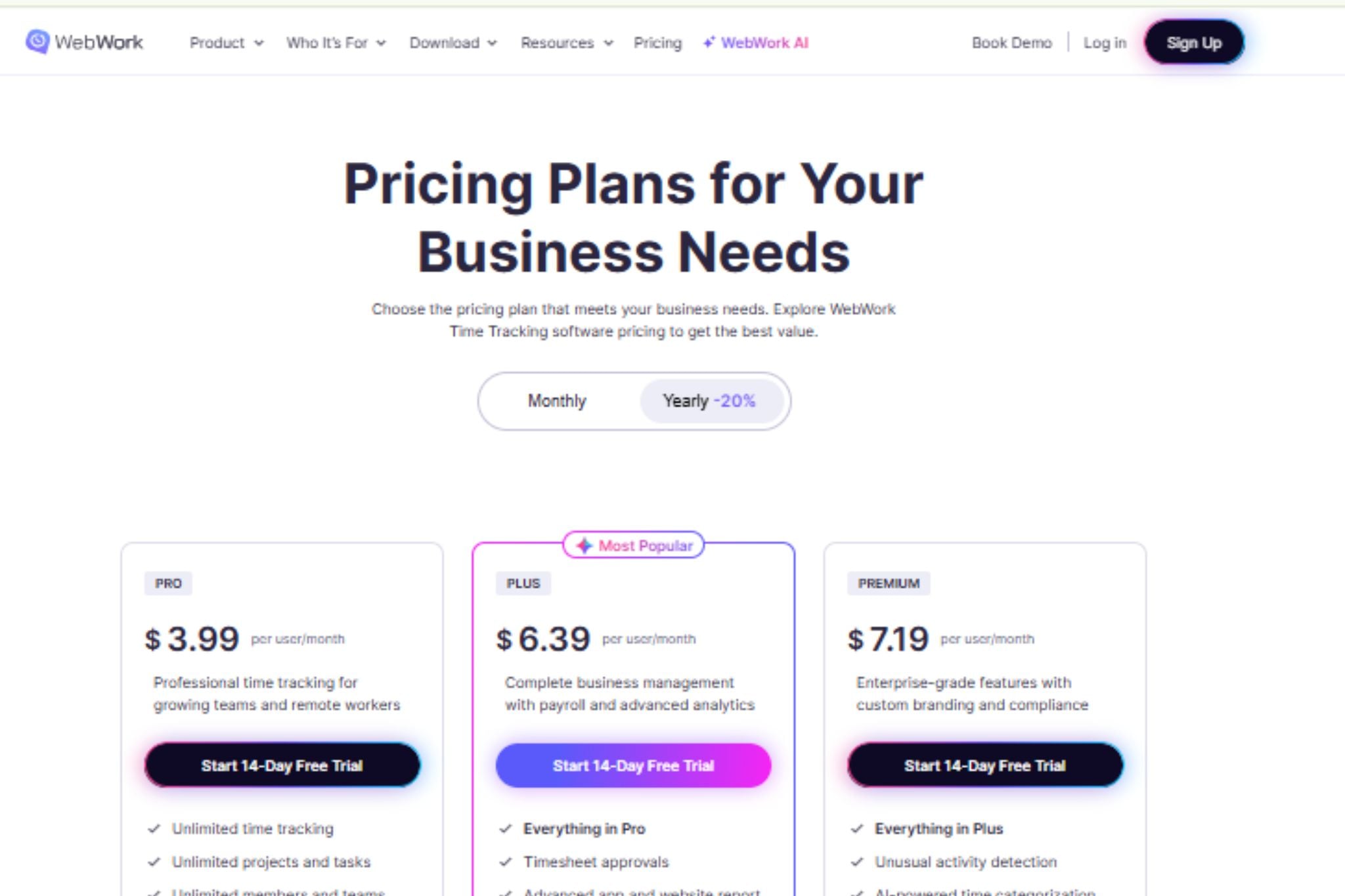
WebWork starts at $3.99 per user per month on annual billing. Pro is $3.99, Plus is $6.39 and Premium is $7.19. Pro on monthly billing is $4.99. Prices checked November 2026. The full list is on the WebWork pricing page.
| What you need | ActivTrak | WebWork |
| Entry price (annual) | $10 | $3.99 |
| Screenshots | $2 add-on, alarm-triggered | Included on all plans |
| App and website usage | From $10 | Pro, $3.99 |
| Real-time visibility | From $10 | Pro, $3.99 |
| Break tracking | From $10 | Pro, $3.99 |
| Burnout risk | $17 | Plus, $6.39 |
| Invoices | Not listed | Pro, $3.99 |
| Payroll | Not listed | Plus, $6.39 (or $1.50 add-on on Pro) |
| Team chat | Not listed | All plans |
| Video meetings | Not listed | Plus, $6.39 |
| SSO | From $10 | Premium, $7.19 |
| Billing | Annual contract only | Monthly or annual |
| Free option | Free for 3 workers | 14-day trial, all features |
Prices checked November 2026.
Several features that ActivTrak sells from $10 sit on WebWork’s $3.99 plan: real-time monitoring, app and website usage, break tracking and screenshots. WebWork also puts chat and invoices in the same workspace, with payroll and shift scheduling from Plus.
ActivTrak has real strengths. SSO and multi-factor authentication come with its $10 plan, while WebWork includes SSO on Premium. ActivTrak also lists SOC 2 Type 2 on every plan and offers a Free tier.
WebWork Pro has limits too. Screenshots run up to 3 every 10 minutes and stay for 3 months. You can run one integration at a time, and chat history is 30 days. Plus and Premium raise these limits.
There is no lock-in contract on WebWork. You can cancel before the next billing cycle.
For 25 people, WebWork Pro costs $1,197 a year, Plus costs $1,917 and Premium costs $2,157. Based on these selected plan configurations, WebWork costs approximately 62% to 68% less than ActivTrak. However, the plans are not identical in features, so compare the features your team actually needs before deciding.
For a similar breakdown of another tool, read our Time Doctor pricing guide. If you wonder whether monitoring improves results at all, see does employee monitoring improve productivity.
Questions to Ask ActivTrak Before You Sign
- What is the exact bundle price for my worker count?
- Do I need Screen Details for every license?
- Does my team size require a paid support plan?
- How long is the contract, and what happens at renewal?
- What happens if my headcount goes over the license count?
Frequently Asked Questions
How much does ActivTrak cost per user?
ActivTrak costs $10 per worker per month for Work Activity Tracking, $15 for Workforce Management and $17 for Productivity Optimization, billed annually. A Free plan covers up to 3 workers. Add-ons such as Screen Details ($2 per worker per month) and AI Insights ($4 per worker per month) cost extra. Prices checked November 2026.
Does ActivTrak have a free plan?
Yes. The Free plan covers up to 3 workers with 30 days of data history. New accounts also get a 14-day trial of the full bundle, and the account drops to Free afterward.
Does ActivTrak include screenshots?
Not in the base plans. Screenshots come with the Screen Details add-on at $2 per worker per month, available on Work Activity Tracking and Workforce Management. WebWork includes screenshots on every plan, starting at $3.99.
Is there a lower-cost alternative to ActivTrak?
Yes. WebWork starts at $3.99 per user per month with annual billing and includes real-time monitoring, app and website usage and screenshots. Start with the 14-day free trial, which includes every feature and needs no credit card.
Final Thoughts
ActivTrak’s pricing is clearer than it was, but the real cost depends on three choices: whether you need screenshots, whether you want the bundle and how many seats you buy.
Write down which reports your managers will open each week. Price that exact set. Then run the same list through at least one alternative before you commit to an annual contract.