
Connecteam pricing looks simple. Paid plans start at $29 a month, and that covers your first 30 users. There’s no per-seat math at the start.
However, the problem is that $29 allows for the purchase of only one hub, while expanding companies need more hubs after reaching certain stages. The price grows as you move further beyond 30 users, and each tier costs extra.
The guide will explore all available tiers, the features they offer, their limitations that managers should know about, and the actual prices for 25, 50, and 100 users. After that, we will compare the figures with WebWork, whose prices start at $3.99/user/month.
All prices were checked in November 2026. Prices from both vendors are subject to change, so make sure to check their pricing pages before ordering.
Connecteam Pricing at a Glance
Connecteam sells three hubs: Operations, Communications and HR & Skills. Each hub has its own plans and its own price. The table shows the price per hub, per month. Each price covers the first 30 users.
| Plan | Annual billing | Monthly billing | Extra user, Operations (annual) | Extra user, Communications or HR & Skills (annual) |
| Basic | $29 | $35 | $0.80 | $0.50 |
| Advanced | $49 | $59 | $2.50 | $1.50 |
| Expert | $99 | $119 | $4.20 | $3.00 |
| Enterprise | Custom | Custom | Custom | Custom |
Prices checked November 2026. USD, per hub, per month.
Annual billing is the lower-priced option. Connecteam offers savings of up to 18% with annual billing compared with monthly billing. Monthly billing also raises the extra-user fees. On Operations they become $1.00, $3.00 and $5.00 per user.
Two free options sit below the paid plans:
- Small Business plan: free for businesses with fewer than 10 employees, with all three hubs included.
- Limited plan: free for life for up to 30 users, but it only covers the essentials of each hub.
Every new account also gets a 14-day trial with no credit card. The trial runs at the Expert level, so you see the full product before you choose.
How the Three Hubs Work
You purchase each hub individually and then choose the level for each of them. For instance, an organization can opt for operations at the expert level, communications at the advanced level, and HR & skills at the basic level. Connecteam also gives that very combination as an example of its pricing model. Each hub provides you with some access to the other two hubs as well.
Operations: time clock, job scheduling, forms, and quick tasks.
Communications: chat, updates, directory, surveys, events, knowledge base, and help desk.
HR & Skills: time off, courses, quizzes, documents, recognition, rewards, hiring, onboarding, and org chart.
For time tracking purposes, it is the Operations hub that matters the most. Chat, training, and onboarding belong to the other two hubs, thus adding their prices to your total.
What Each Connecteam Plan Includes
Each tier includes everything in the tier below it. The details below start with Operations, then cover the other two hubs.
Small Business and Limited (Free)
Connecteam says the Small Business plan includes all three hubs, subject to the plan’s limits. The caps are tight: a single time clock, a single schedule and 500MB per knowledge base. One gap matters for payroll. Connecteam’s comparison table marks payroll integration as not included on this plan.
The Limited plan is thinner. You get one time clock and up to five jobs. GPS stamps, break rules, overtime rules and payroll integration all start at Basic.
Basic ($29)
Basic is where the time clock becomes usable for payroll. You get:
- Real-time clock in and out with GPS stamps
- Unlimited jobs, such as clients or projects
- Payroll integration
- Overtime rules and paid or unpaid breaks
- Exportable timesheets and history beyond 30 days
- Basic scheduling with open shifts
- Unlimited checklists, forms and tasks
The limits: one time clock and one schedule. The full timesheet submission and approval flow starts at Advanced.
Advanced ($49)
Advanced fits teams with more than one site or crew. It adds:
- Up to 3 time clocks and up to 6 schedules
- Up to 10 geofence sites
- Auto clock out
- Timesheet submission and approval
- Pay rates per user
- Repeating shifts and schedule templates
- Bulk actions and conditional form fields
Expert ($99)
Expert is built for automation. It adds:
- Up to 6 time clocks and up to 12 schedules
- Unlimited geofence sites
- Breadcrumbs, which track GPS location only while someone is on the clock
- Auto-assigned shifts
- Timesheet issue checks before payroll
- Automated reports (up to 3)
- API access and webhooks
Enterprise (Custom)
Enterprise adds unlimited time clocks and schedules, unlimited automated reports, single sign-on, two-factor authentication, biometric app lock and a personal success manager. Connecteam mostly recommends it for companies with 201 to 10,000 employees. Pricing needs a sales call.
The Other Two Hubs
Communications: Basic includes unlimited chats, multimedia attachments, and a company feed. Advanced features come with scheduled messaging, live polls, anonymous surveys, and intelligent groups. The expert adds automatically translated posts, popup notifications with read receipt functionality, and access to the API. Help Desk ranges from one for Basic to three for Advanced and up to twelve for Expert plans.
HR & Skills: Basic lets you manage time-off approvals, create courses with quizzes, and manage up to six time-off policies. Advanced increases the limit to nine policies and adds unlimited courses and up to two e-sign documents. Expert includes unlimited time-off policies and up to ten e-sign documents.
Hidden Costs and Limits to Check Before You Buy
The Fee After User 30
The flat price ends at 30 users. After that, you pay per extra user. Operations fees climb quickly by tier: $0.80 on Basic, $2.50 on Advanced and $4.20 on Expert. Communications and HR & Skills run lower at $0.50, $1.50 and $3.00.
Here’s an example. A 60-person team on Operations Advanced pays $49 plus 30 extra users at $2.50. That’s $124 a month for one hub.
Features Placed Higher Up
- SSO, two-factor authentication and biometric app lock are listed under Enterprise.
- API access starts at Expert.
- HIPAA-registered accounts carry additional fees on every plan, according to Connecteam’s comparison table.
- Time clocks, schedules and help desks are capped by tier. Multi-location teams get pushed to Advanced or Expert.
- Knowledge base storage per base is 1GB on Basic, 5GB on Advanced and 10GB on Expert.
Billing and Cancellation Rules
- Monthly plans cancel any time, but prepaid amounts aren’t refunded.
- Annual plans include a prorated refund if you cancel within 30 days.
- Seats added mid-cycle are prorated. Add a $3 seat halfway through the month and you pay $1.50 now.
- Prices are in USD only.
- After the trial, you choose a paid plan, the Limited plan or, for small teams, the Small Business plan. The Limited plan drops some features you saw during the trial.
What Connecteam Really Costs for 25, 50 and 100 Users
Per-hub prices hide the real bill. Here’s what teams pay each month on annual billing.
Operations hub only (time clock, scheduling, forms, tasks)
| Team size | Basic | Advanced | Expert |
| 25 users | $29 | $49 | $99 |
| 50 users | $45 | $99 | $183 |
| 100 users | $85 | $224 | $393 |
All three hubs on the same tier
| Team size | Basic | Advanced | Expert |
| 25 users | $87 | $147 | $297 |
| 50 users | $123 | $257 | $501 |
| 100 users | $213 | $532 | $1,011 |
Prices checked November 2026. Monthly cost, annual billing, before tax.
Small teams get the best deal. Businesses with fewer than 10 employees can use the Small Business plan for free. A 30-person team on Operations Basic pays $29, which is under $1 per user.
The picture changes at scale. At 100 users, Operations Expert alone costs $393 a month. All three hubs on Expert cost $1,011, or about $10 per user.
Which Connecteam Plan Fits Which Team
- Fewer than 10 employees: the Small Business plan. It’s free and includes all three hubs.
- 11 to 30 users, one location: Basic. A flat $29 gets you the time clock, GPS stamps and payroll integration.
- Several sites or crews: Advanced. You get more clocks and schedules, geofencing for up to 10 sites and timesheet approvals.
- Teams that want automation or an API: Expert.
- Around 200 or more employees, or SSO needs: Enterprise.
Connecteam vs. WebWork Pricing
The two platforms overlap on time tracking, but they serve different needs. Connecteam is designed for non-desk employees, bringing scheduling, forms, training and HR tools together in one app. By contrast, WebWork focuses on time tracking with monitoring features. WebWork focuses on time tracking with monitoring, productivity data and payroll. Compare them on what you need, not only on price.
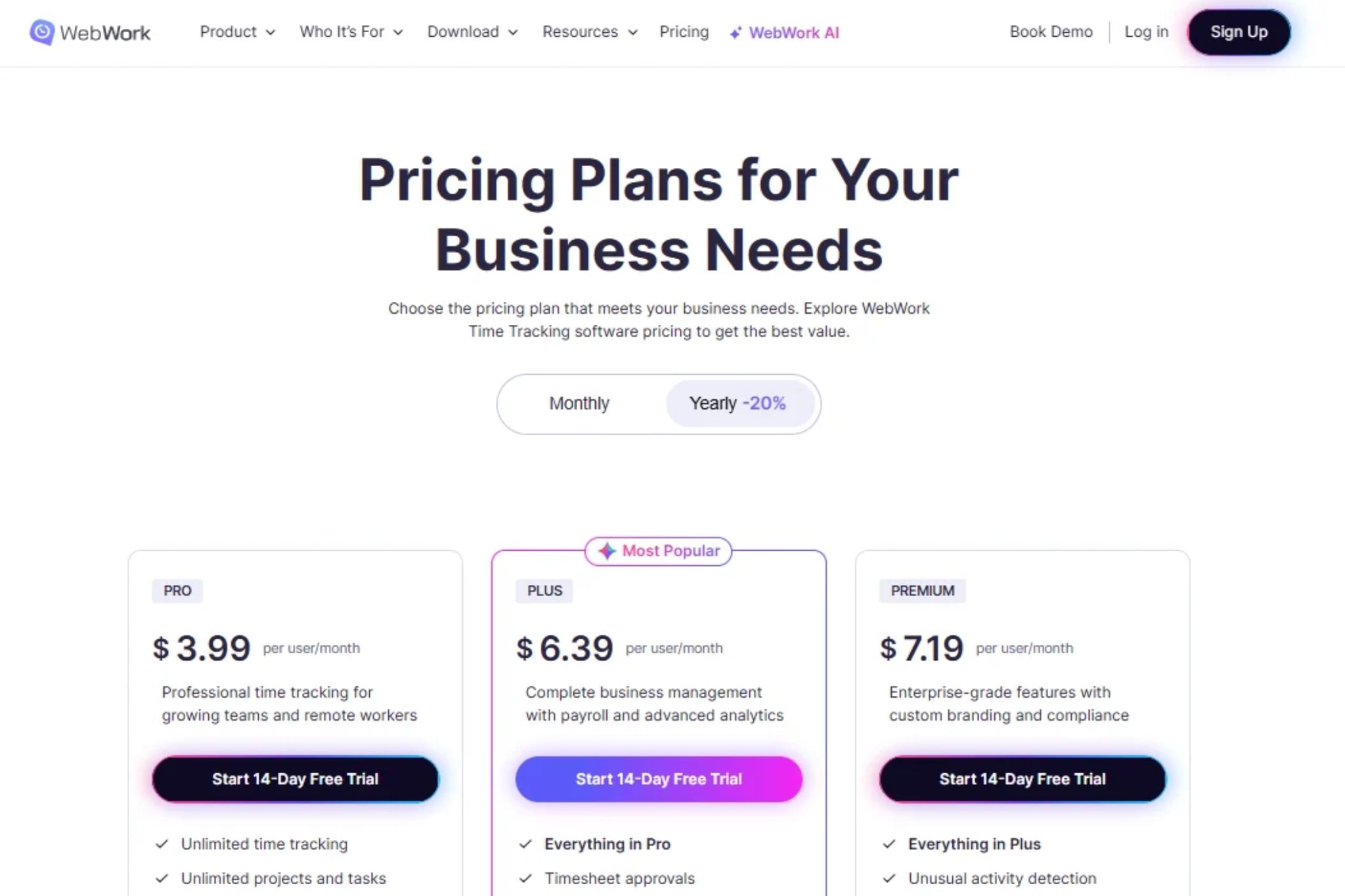
WebWork pricing starts at $3.99 per user per month on annual billing, or $4.99 on monthly billing. Plus is $6.39 and Premium is $7.19. Every plan has a 14-day trial with all features and no credit card. There’s no free plan.
| Team size | WebWork Pro ($3.99) | WebWork Plus ($6.39) | WebWork Premium ($7.19) |
| 25 users | $99.75 | $159.75 | $179.75 |
| 50 users | $199.50 | $319.50 | $359.50 |
| 100 users | $399 | $639 | $719 |
On price alone, Connecteam costs less at its Basic and Advanced tiers when all three hubs are included. However, the actual value depends on which features your team needs. For 25 users, Basic across three hubs is $87 against $99.75 for WebWork Pro. At Expert, WebWork becomes less expensive at this tier. Three Expert hubs cost $297 for 25 users, while WebWork Premium costs $179.75. For eligible businesses with fewer than 10 employees, Connecteam’s free plan beats any paid tool on price.
Price isn’t the whole story, so here’s what each plan includes.
| Feature | Connecteam | WebWork |
| Starting price (annual) | Free for businesses with fewer than 10 employees, then $29 per hub for the first 30 users | $3.99 per user |
| Pricing model | Flat fee per hub, then per extra user | Per user, one workspace |
| Free plan | Yes (Small Business, Limited) | No, 14-day trial |
| Time clock with GPS | Basic and up | All plans |
| Geofencing | Advanced and up (up to 10 sites) | All plans |
| Kiosk | All plans | All plans |
| Shift scheduling | All plans (one schedule on Basic) | Plus and up |
| Timesheet approvals | Advanced and up | Plus and up |
| Screenshots | Not listed | All plans |
| App and website usage | Not listed | All plans |
| Activity level tracking | Not listed | All plans |
| Team chat | All plans | All plans |
| Video meetings | Not listed | Plus and up |
| Payroll | Payroll integration from Basic | Built-in from Plus, $1.50 add-on on Pro |
| SSO | Enterprise | Premium |
| HIPAA | Additional fees on all plans | Premium |
| API access | Expert and up | All plans |
Prices and features checked November 2026. “Not listed” means the feature does not appear on Connecteam’s pricing page.
Connecteam’s pricing page lists no screenshots, app and website tracking or activity levels on any plan. WebWork includes all three from Pro. If your managers need that visibility for remote or hybrid teams, that’s the deciding factor. Our employee monitoring software page shows how it works. If you’re new to monitoring, start with our guide to privacy-conscious employee monitoring.
WebWork also covers field teams, with geofencing and a kiosk for shared devices included in all three plans. Pro has limits of its own: up to three screenshots every 10 minutes, three months of screenshot retention, 30 days of chat history and one active integration. Shift scheduling, timesheet approvals and built-in payroll start at Plus. WebWork also counts the workspace owner as a paid member, while project viewers are free.
If your team is hourly, deskless and shift-based, and you want scheduling, training and chat in one app, Connecteam’s flat fee is hard to ignore. If you manage remote, hybrid or office teams and need time, productivity and payroll data together, WebWork fits better.
How to Avoid Overpaying for Any Workforce App
Run through five checks before you sign.
- Count your hubs or modules. Add up every piece you’ll need, not just the first one.
- List the features you’ll use every week. Ignore the rest.
- Check the caps. Time clocks, schedules and storage limits push teams to higher tiers.
- Price your real headcount. Flat fees are generous at 25 users and less so at 100.
- Trial with real shifts. Run your actual schedule for 14 days.
Rolling out a new tool also takes planning. Our guides on time tracking best practices and how to introduce time tracking to your team cover the people side.
Frequently Asked Questions
How much does Connecteam cost per user?
Connecteam doesn’t charge per user at first. Each hub costs a flat $29, $49 or $99 a month on annual billing for the first 30 users (Basic, Advanced and Expert). Monthly billing is $35, $59 and $119. After 30 users, you pay per extra user: $0.80 to $4.20 on Operations and $0.50 to $3.00 on the other two hubs. Prices checked November 2026.
Is Connecteam free?
Yes, it is free in two ways. The Small Business plan is free for businesses with fewer than 10 employees and includes all three hubs. The Limited plan is free forever for up to 30 users but with fewer features. Also, new users have a 14-day trial on the Expert plan.
What is the cost of Connecteam for 50 users?
When billed annually, the cost of using just the Operations hub is $45, $99, and $183 for Basic, Advanced, and Expert plans, respectively. If you want to use all three hubs on the same tier, it will cost you $123, $257, and $501. The prices were verified in November 2026.
Is there any Connecteam alternative with employee monitoring?
Yes, WebWork has all features of monitoring: screenshots, application/website usage, and activity level tracking are available on all plans. It starts at $3.99/user/month when billed annually. All plans have a 14-day free trial without a credit card needed.
Final Thoughts
Connecteam’s flat fee for the first 30 users is generous, and its free plan is real. The bill rises with extra users, higher tiers and every added hub.
Know which hubs you need, price the full bundle at your headcount and ask what the tool can’t do. Then pick the one built for how your team works.