


It’s 2:00 pm on a Tuesday, and many of your team members’ statuses on Teams are a mix of ‘Available’ and ‘Busy.’ Calendars are full. Email responses are fast. You lean back. What a productive start to the week.
Or so you thought.
At the weekly alignment meeting, you find out that a key project is behind schedule. We need more time, a team member says. The project might be delayed for a week or so.
What happened? No one seemed idle earlier. But it turns out some team members spent their time on shallow work, such as emails, coordination, and upkeep (like fixing spreadsheets or organizing files). They procrastinated the deep and difficult work needed to accomplish the project.
You’ve been hit by a work problem called time leakage.
Detecting time leakage
Time leakage is the unnoticed loss of productive work hours due to inefficiencies, distractions, or seemingly small and harmless actions like excessive phone checking and unnecessary meetings.
Sometimes, time leakage is hidden beneath visible activity. In this case, the challenge isn’t the lack of work but a lack of progress, which is a common frustration among many managers. It is easy to associate responsiveness and visible effort with productivity, until delays have snowballed.
Or sometimes, progress does happen, but more slowly than expected because of time leakages. This translates to time that could have been spent working on the next project or milestone.
Other times, time leakage is a result of neglect–a lunch hour gone too long, or a team member recording half an hour of client work when 10 minutes were spent on social media.
Many organizations, whether on-site, hybrid, or remote, experience some degree of time leakage–often without realizing it. Time leakage is rarely discussed in the workplace, but it is a real and pressing problem that drains companies of focus, energy, and profit.
So how can teams reduce time leakage?
Not micromanagement, which lowers team morale. Not stricter time recording, which is another laborious task in itself, and can distract your team members from actual work.
Instead, companies could benefit from investing in a strong time-tracking platform.

How a strong time-tracking platform reduces time leakages
There are different platforms that track employee productivity. But the best time-trackers allow organizations to:
Integrate AI into the workflow
One of the wonders of Artificial Intelligence (AI) is the ability to gain insights into how your team is doing.
Particularly with WebWork’s AI employee monitoring software, organizations can now track their team members’ activity levels individually and check if they are focused on deep tasks.
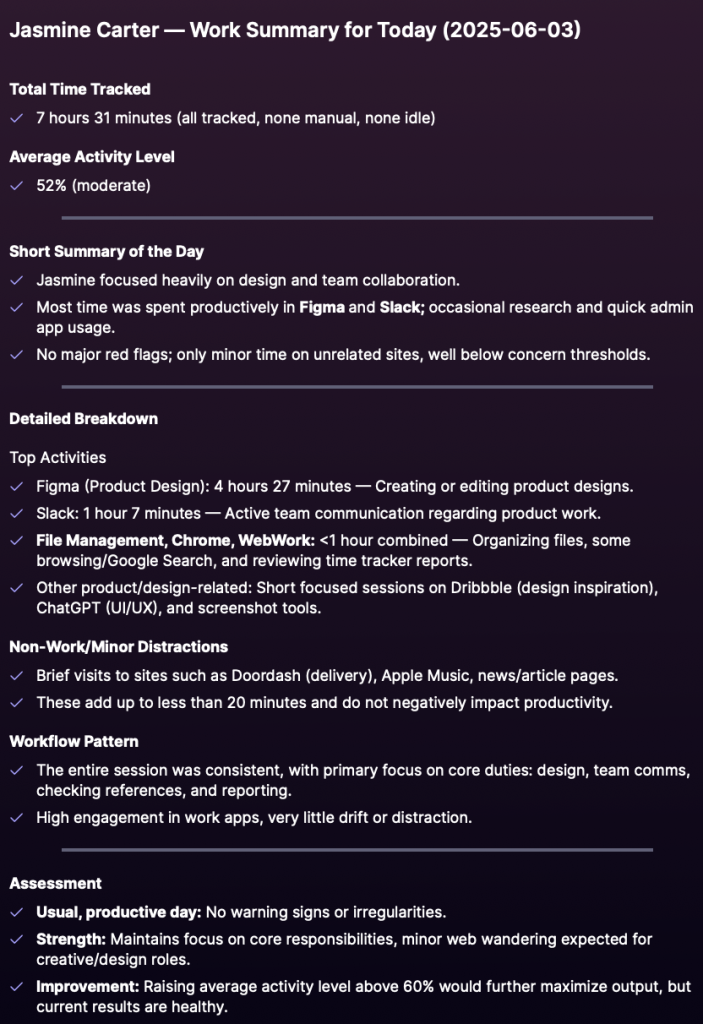
Managers can even engage with WebWork’s AI solution with prompts such as “Analyze Adam’s performance today”, “How did Derek perform compared to last week?”, or “What’s my team been working on lately?”
From there, you get a detailed report. Here is an example of a workday breakdown by WebWork AI.
Schedule daily reports
Daily team check-ins or end-of-day/week reports can take up time.
By automating the process, you get regular reports that don’t have to be manually prepared by your team.
With WebWork, you get to choose whether to receive these reports via email or on your team’s Slack channel. You could also select the time, frequency, time period, timezone, and more.
WebWork gives you many report types to choose from. Some key data include:
- Real-time Employee Monitoring. Real-time visibility enables managers to understand who is productive, where effort is concentrated, and where gaps are emerging. No more relying on anecdotal updates.
- Activity level. WebWork’s real-time reports track activity levels and time for each of your members’ projects. Organizations can also view activity descriptions for each workplace member.
- Tasks. See when a team member worked on a task and how much time they spent.
All of the data provided comes from WebWork’s automated reporting, which makes it accurate, objective, and retrievable at any time.
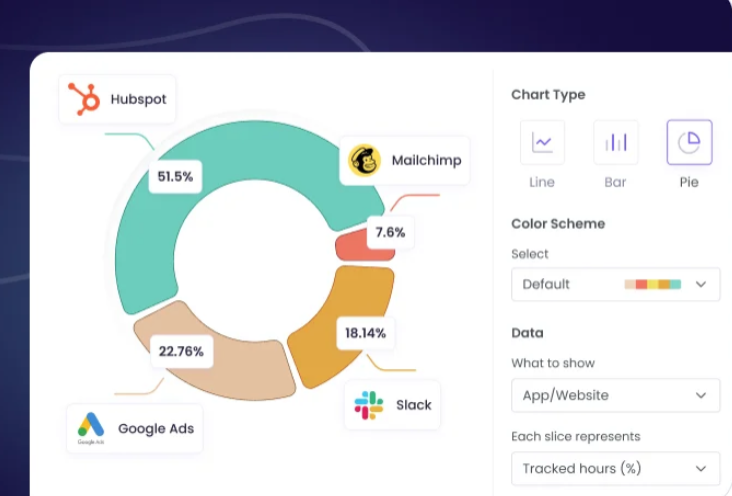
WebWork also makes data easier to appreciate by visualizing it in pie, bar, or line charts.
Manage tasks and deadlines more efficiently
With a time-tracking platform, there is a proper system for monitoring and managing team members’ progress.
On WebWork, you can create and assign tasks to workplace members. Fill in all the details: due date, priority, status, and even subtasks for larger assignments. Once your team starts working on a project, the platform reflects how much time they spent on each task.
WebWork’s Employee Task Management system also displays tasks as deadlines approach, making it easier for teams to stay on top of timelines.
Moreover, you get a bird’s-eye view of a project’s milestones: which tasks have not yet started, which are ongoing, and which are complete.
WebWork can also track app and website usage, as well as mouse and keyboard activity. The platform is ideal for hybrid and remote teams where employee visibility is limited.
Powerful data insights and privacy in one
Of course, privacy is a top consideration when investing in time-tracking software.
WebWork comes with a strong infrastructure that protects your data. Everything is stored on highly secure cloud servers, including Amazon S3 and Contabo, which provide state-of-the-art privacy measures.
All data transmitted between your device and WebWork’s servers is encrypted, using DigiCert’s SSL/TLS certificates. WebWork also implements password hashing, access controls, and continuous reviews.
Only authorized personnel have access to sensitive data. Similarly, the Member Types feature provides different sets of permissions and access for workspace members.
Moreover, WebWork partners with Cloudflare, a cutting-edge global security network that protects the platform against cyber threats.
WebWork also regularly audits its system for vulnerabilities and conducts penetration tests to maintain robust employee monitoring, privacy, and security.
Ultimately, a time-tracking system like WebWork gives teams a strong sense of accountability, responsibility, and urgency.
This is not due to micromanagement or pressure, but because of a system that shows how effort turns into outcomes, redirecting focus to the work that needs to be done.
Because it is not enough to know whether teams are working.
What matters is if the work is moving the business forward.









